No PO Box Checkout for Magento 2
This extension provides the validation of the shipping and billing address during the checkout process based on the settings configured in the Admin panel.

- Enable/Disable the No PO Box Checkout extension from the configuration.
- Bypass customer groups that are allowed from the configuration.
- A list of restricted words that cannot be present in the address fields.



-
 Developed By Best Certified Developers
 -
Trusted Quality
-
Free Support For 90 Days
-
45-day Money-back Guarantee
-
Paid on-demand Customization
-
Free Updates


Overview of Magento 2 No PO Box Checkout Extension
The "No PO Boxes Checkout" is often seen as one of the less secure methods, as it can open the door to fraud and the misuse of goods and services. As a result, many online stores choose to disable this option from their list of available shipping methods.
The extension prevents P.O. Box in addresses. It also provides error messaging to inform customers which word is restricted in the shipping address before placing an order.
Highlights of Magento 2 No PO Box Checkout Extension
-

Multistore Supported
Admin can configure it as per the stores.
-
Bypass customer group
Admin can bypass a specific customer group from validating a PO Box.


Features of Magento 2 No PO Box Checkout Extension
-
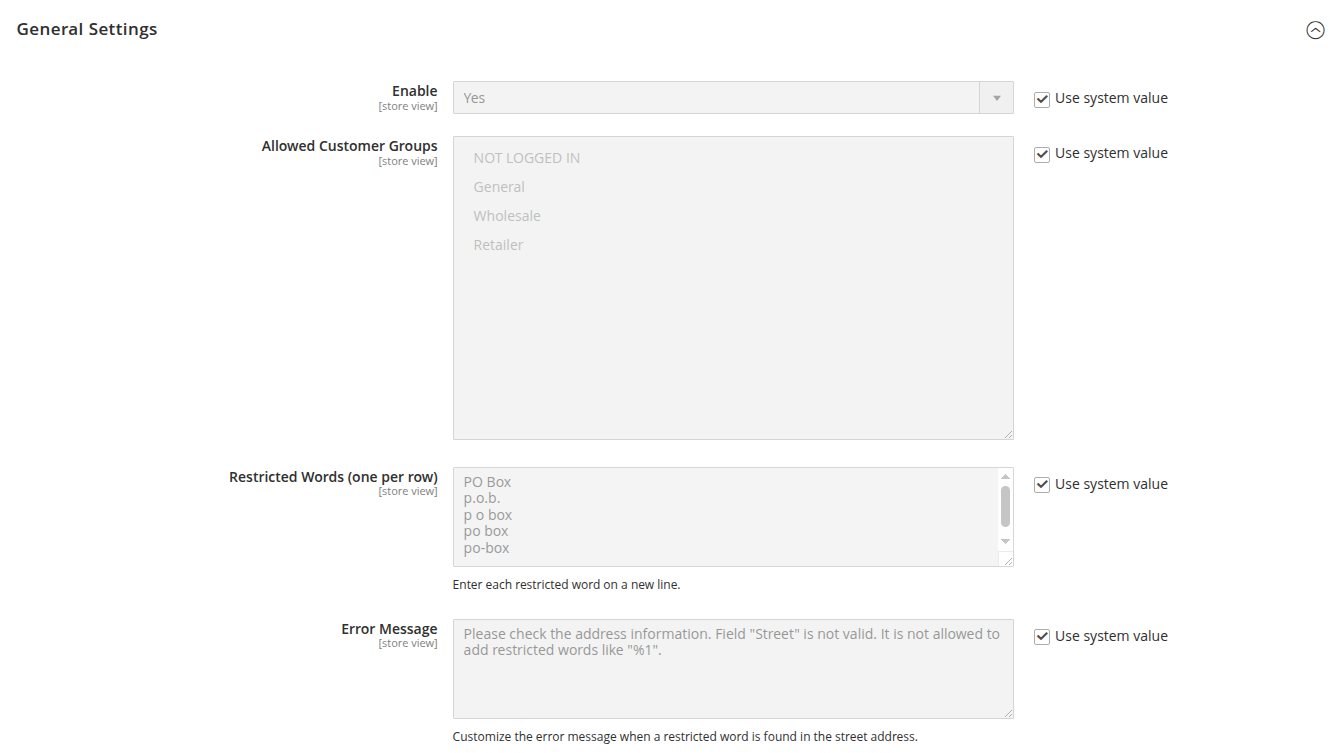
Facilitates the admin to configure the extension
- Enable Address Validation: Activates or disables the address validation feature during checkout. When enabled, the shipping address will be checked for errors or restricted terms. If disabled, address validation is bypassed.
- Allowed Customer Groups: Specifies which customer groups can use the restricted words in the address. Only customers belonging to the selected groups will be bypassed, and their addresses must not be validated during checkout.
- Restricted Words: Allows administrators to define a list of restricted words that should not appear in address fields (e.g., street names). Any address containing these words will trigger a validation error, preventing their inclusion.
-
Address Validation Frontend
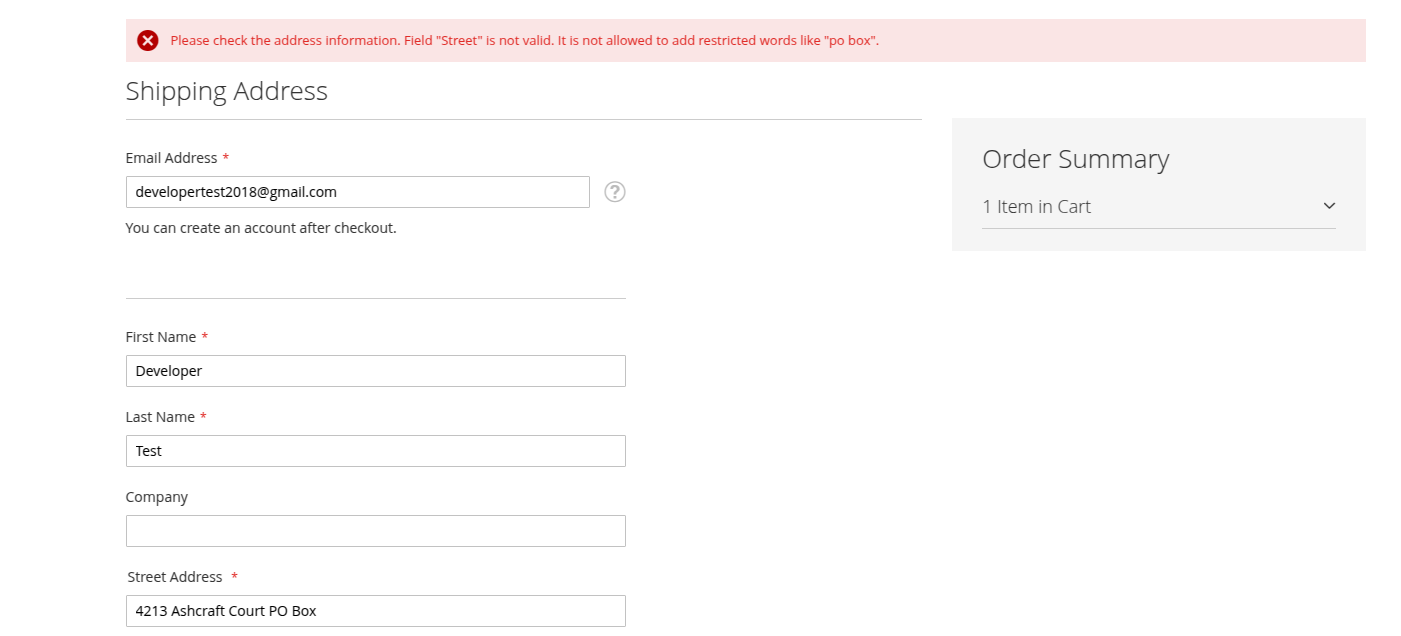
- During Checkout (Shipping Address Stage): If a customer enters a shipping address containing any of the restricted words, an error message will be displayed on the frontend. The customer will be prompted to correct the address before proceeding with checkout. The checkout process will be blocked until the restricted word is removed from the shipping address.
- As soon as the user enters a restricted keyword like "PO Box" in the Street field of the shipping address form, Magento immediately displays a validation message before proceeding to the next step.
- An error message is displayed during checkout when "PO Box" is entered in the street field.
- Error Message: Please check the address information. Field 'Street' is not valid. It is not allowed to add restricted words like 'po box'.
- This prevents the user from continuing until the issue is corrected.
-
Address Validation Prior to Placing an Order
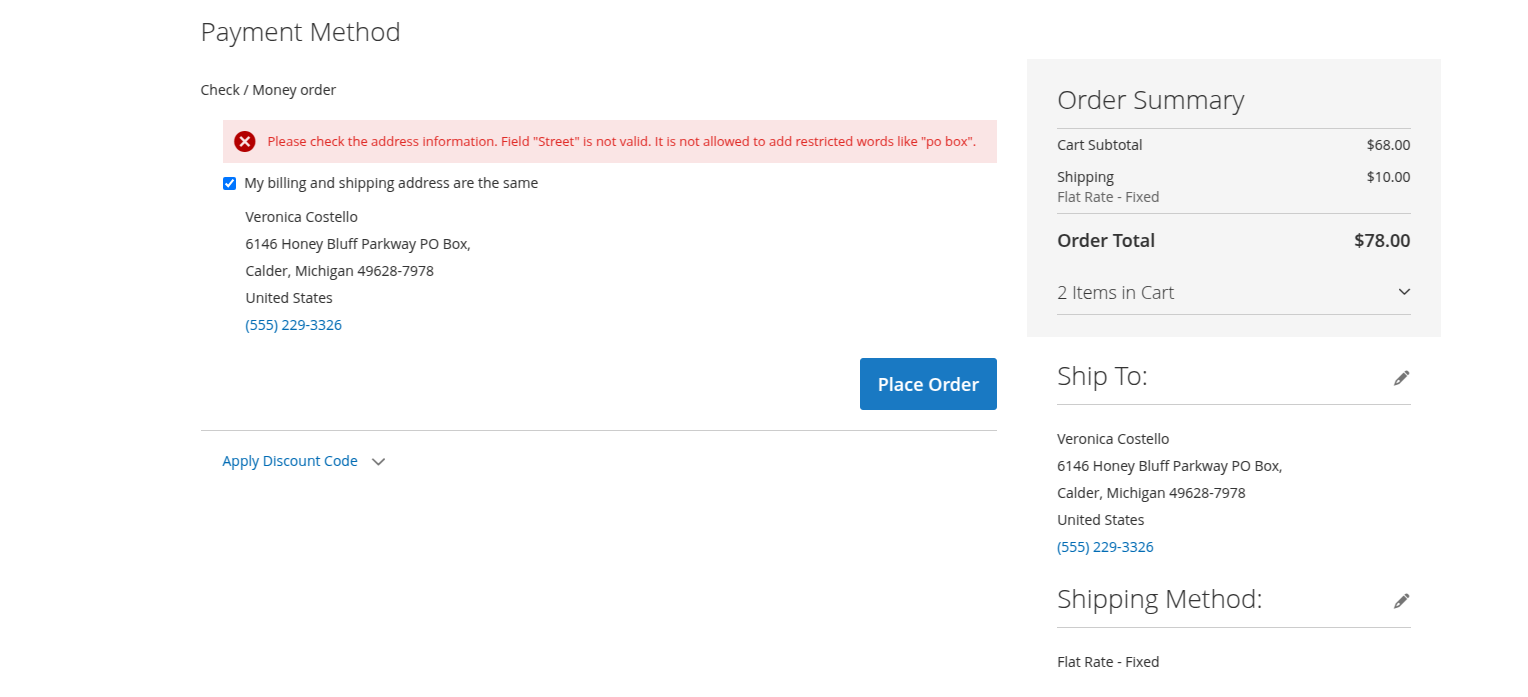
- Before Placing the Order (Final Step):
- Even if the user bypasses earlier validation (e.g., via browser manipulation or autofill), we will again check for restricted terms before placing the order. If any are found, the order is blocked, and the user is presented with the same validation error.
- Final order placement blocked due to restricted keyword in the address.
- This double validation approach ensures that restricted addresses cannot be submitted, improving delivery reliability and compliance with carrier policies.
Dolphin products work fine with every theme and extension from other service providers. However, if you encounter any issues, our developers will troubleshoot and fix them. You can always raise a ticket for your concern and get immediate assistance from our experts.
Version: 1.0.0
Release Note: First Release
Magento Compatibility: 2.4.*
Want us to customize according to your business needs?