---
title: "Magento 2 Add Pagination in Custom Collection"
url: "https://dolphinwebsolution.com/magento-2-add-pagination-in-custom-collection-of"
date: "2020-10-10T09:24:10+05:30"
modified: "2023-08-31T05:00:05+05:30"
author:
name: "Mahesh Makwana"
categories:
- "Magento"
tags:
- "Magento 2.x"
- "Magento developers"
word_count: 1141
reading_time: "6 min read"
summary: "Today we will learn how to add custom pagination for custom collection in Magento 2. Pagination is the process of separating print or digital content into discrete pages. Pagination is an ordinal n..."
description: "Today we will learn how to add custom pagination for custom collection in Magento 2. Pagination also refers to the automated process of adding consecutive n..."
keywords: "custom pagination in magento 2,pagination not working in magento 2,add pagination in magento 2,add custom pagination in magento 2,pagination in magento2,magento 2 custom pagination,magento 2 pagination custom collection,magento 2 pagination programmatically,how to add pagination in magento 2, Magento 2.x, Magento developers"
language: "en"
schema_type: "Article"
related_posts:
- title: "How to Create Module in Magento 2"
url: "https://dolphinwebsolution.com/how-to-create-module-in-magento-2"
- title: "Magento 2 SMTP for Gmail not working"
url: "https://dolphinwebsolution.com/magento-2-smtp-for-gmail-not-working"
- title: "How Magento 2 identify module"
url: "https://dolphinwebsolution.com/how-magento-2-identify-module"
---
# Magento 2 Add Pagination in Custom Collection
_Published: October 10, 2020_
_Author: Mahesh Makwana_

> Today we will learn how to add custom pagination for custom collection in Magento 2. Pagination is the process of separating print or digital content into discrete pages. Pagination is an ordinal numbering of pages, which is usually located at the bottom of the site pages. Pagination also refers to the automated process of adding consecutive numbers to identify the sequential order of pages.
Pagination is the process of separating print or digital content into discrete pages. It is an ordinal numbering of pages, which is usually located at the bottom of the site pages. Pagination also refers to the automated process of adding consecutive numbers to identify the sequential order of pages. Some types of website content benefit from being broken into separate pages to make them more user-friendly, such as search engine results pages (SERP), blogs and discussion forums.
[Magento 2 provides the default pagination](https://experienceleague.adobe.com/docs/commerce-admin/catalog/catalog/navigation/navigation-product-listings.html#pagination-controls) for the product pages, category pages, My Orders, etc at the frontend. It helps in easy navigation. Moreover, without pagination, the page load time would increase due to a large amount of content, links, etc. on a single page. It affects the user experience of the page and hence degrades the SEO!
Today we will learn how to add custom pagination for custom collection in Magento 2. Before adding the below files create a Model. if you don’t know about to create a model then you can [hire our Magento 2 expert.](https://dolphinwebsolution.com/hire-magento-2-developers/)
## Please follow the below steps for add custom pagination:
### **Step-1 :** Create controller file **Index.php** at **app/code/Dolphin/CustomModule/Controller/Index** and add below code.
```
resultPageFactory = $resultPageFactory;
parent::__construct($context);
}
public function execute()
{
$resultRedirect = $this->resultFactory->create(ResultFactory::TYPE_REDIRECT);
$resultPage = $this->resultPageFactory->create();
$resultPage->getConfig()->getTitle()->set(__('Custom Pagination'));
return $resultPage;
}
}
```
### **Step-2:** Create block file **Pager.php** at **app/code/Dolphin/CustomModule/Block** and add the below code.
```
customFactory = $customFactory;
$this->customdataCollection = $customdataCollection;
}
protected function _prepareLayout()
{
$this->pageConfig->getTitle()->set(__('My Custom Pagination'));
parent::_prepareLayout();
$page_size = $this->getPagerCount();
$page_data = $this->getCustomData();
if ($this->getCustomData()) {
$pager = $this->getLayout()->createBlock(
\Magento\Theme\Block\Html\Pager::class,
'custom.pager.name'
)
->setAvailableLimit($page_size)
->setShowPerPage(true)
->setCollection($page_data);
$this->setChild('pager', $pager);
$this->getCustomData()->load();
}
return $this;
}
public function getPagerHtml()
{
return $this->getChildHtml('pager');
}
public function getCustomData()
{
// get param values
$page = ($this->getRequest()->getParam('p')) ? $this->getRequest()->getParam('p') : 1;
$pageSize = ($this->getRequest()->getParam('limit')) ? $this->getRequest()->getParam('limit') : 5; // set minimum records
// get custom collection
$collection = $this->customFactory->getCollection();
$collection->setPageSize($pageSize);
$collection->setCurPage($page);
return $collection;
}
public function getPagerCount()
{
// get collection
$minimum_show = 5; // set minimum records
$page_array = [];
$list_data = $this->customdataCollection->create();
$list_count = ceil(count($list_data->getData()));
$show_count = $minimum_show + 1;
if (count($list_data->getData()) >= $show_count) {
$list_count = $list_count / $minimum_show;
$page_nu = $total = $minimum_show;
$page_array[$minimum_show] = $minimum_show;
for ($x = 0; $x <= $list_count; $x++) {
$total = $total + $page_nu;
$page_array[$total] = $total;
}
} else {
$page_array[$minimum_show] = $minimum_show;
$minimum_show = $minimum_show + $minimum_show;
$page_array[$minimum_show] = $minimum_show;
}
return $page_array;
}
}
```
Here **\_prepareLayout()** method is called immediately after a block has been added to the layout for the first time and set custom pagination with custom data. We are added dynamic pagination count using **getPagerCount()** method. In this method we set minimum record count 5. You can also change this record count.
### **Step-3 :** Create template file **pager.phtml** at **app/code/Dolphin/CustomModule/view/frontend/templates** and add below code.
```
getCustomData();
?>
```
```
getPagerHtml()): ?>
getPagerHtml() ?>
```
### **Step-4 :** Create layout file **frontroutename\_index\_index.phtml** at **app/code/Dolphin/CustomModule/view/frontend/layout** and add below code.
```
```
**In this file, name must be like this frontroutename\_controllername\_actionfilename.xml**
### **Step-5:** Run Magento upgrade and flush cache command.
```
bin/magento setup:upgrade
bin/magento c:f
```
### **Step-6:** Run below URL
```
http:///frontroutename/index/index
```
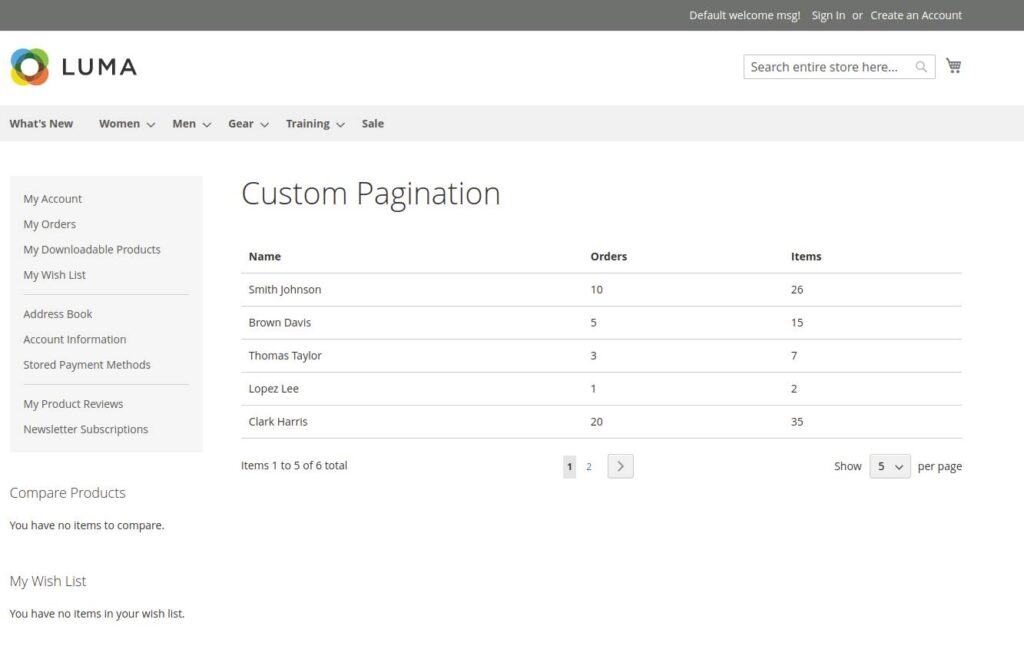
**You custom pagination looks like this :**
You also like to read this:
- [Display Image in Admin UI Grid](https://dolphinwebsolution.com/magento-2-display-image-in-admin-ui-component-grid)
- [Create Custom Widget in Magento 2](https://dolphinwebsolution.com/how-to-create-custom-widget-in-magento-2)
I hope this helps you. For any doubts regarding this topic, please write your doubts in below comments section or [CONTACT US](https://dolphinwebsolution.com/contact-us/)
---
_View the original post at: [https://dolphinwebsolution.com/magento-2-add-pagination-in-custom-collection-of](https://dolphinwebsolution.com/magento-2-add-pagination-in-custom-collection-of)_
_Served as markdown by [Third Audience](https://github.com/third-audience) v3.5.3_
_Generated: 2026-08-26 07:39:36 UTC_