---
title: "How to show product custom option into custom page in Magento 2"
url: "https://dolphinwebsolution.com/how-to-show-product-custom-option-into-custom-page-in-magento-2"
date: "2020-10-21T13:15:16+05:30"
modified: "2023-08-24T09:36:32+05:30"
author:
name: "Mahesh Makwana"
categories:
- "Magento"
word_count: 977
reading_time: "5 min read"
summary: "With custom options, it’s added some additional features for simple, configurable, downloadable and virtual products in Magento 2. This enable the creation of product variations. Bundle product a..."
description: "when we are adding Magento custom options programmatically to the product then we get more opportunities to make our product more flexible. A product custom ..."
keywords: "product custom option,magento custom options programmatically,custom options programmatically,magento 2 add custom product type,magento 2 add new custom option text field,custom options in magento 2,magento 2 add custom option programmatically,magento 2 custom option marketplace add-on,magento 2 add custom option to product custom page,magento 2 add custom option to quote item,magento 2 add product to custom page with custom options programmatically,magento 2 custom option, Magento"
language: "en"
schema_type: "Article"
related_posts:
- title: "How to Display swatches instead of labeled product options on Checkout in Magento 2"
url: "https://dolphinwebsolution.com/how-to-display-swatches-instead-of-labeled-product-options-on-checkout-in-magento-2"
- title: "Top 10 Shopware Development Companies in 2026"
url: "https://dolphinwebsolution.com/blog/top-10-shopware-development-companies/"
- title: "How to Add Custom Tab in Product Page Magento 2"
url: "https://dolphinwebsolution.com/how-to-add-custom-tab-in-product-page-magento-2"
---
# How to show product custom option into custom page in Magento 2
_Published: October 21, 2020_
_Author: Mahesh Makwana_

> With custom options, it’s added some additional features for simple, configurable, downloadable and virtual products in Magento 2. This enable the creation of product variations. Bundle product and grouped product not support custom options. when we are adding custom options to the product then we get the more opportunity to make our product more flexible. Product with custom options are not configurable product. Product with custom options not change product type.
With product custom options, it’s added some additional features for [simple](https://docs.magento.com/user-guide/catalog/product-create-simple.html "Simple Product"), [configurable](https://docs.magento.com/user-guide/catalog/product-create-configurable.html "Configurable Product"), [downloadable](https://docs.magento.com/user-guide/catalog/product-create-downloadable.html "Downloadable Product") and [virtual](https://docs.magento.com/user-guide/catalog/product-create-virtual.html "Virtual Product") products in Magento 2. This enables the creation of product variations. [Bundle product](https://docs.magento.com/user-guide/catalog/product-create-bundle.html "Bundle Product") and [grouped product](https://docs.magento.com/user-guide/catalog/product-create-grouped.html "Grouped Product") not support custom options.
when we are adding custom options programmatically to the product then we get more opportunities to make our product more flexible. A product with custom options is not a configurable product. Product custom option, not change product type.
When we add a custom option to the product then that product has shown different options with different prices also. To add a custom option to the product [click here.](https://docs.magento.com/user-guide/catalog/settings-advanced-custom-options.html "Add Custom Option In Admin Magento 2") Magento Custom options require less effort from the [admin](https://dolphinwebsolution.com/shop/magento-2-extensions/administration.html) and provide more flexibility for future data editing. Custom options can be found by customers on a product detail page. We need to set up a custom option per product in Magento 2. [SEO](https://en.wikipedia.org/wiki/Search_engine_optimization) tools cannot track product’s custom options.
#### How to show product custom options programmatically?
**Step-1 :** Create **registration.php** file at **app/code/Dolphin/Blog** and add below code.
```
```
**Step-3 :** Create **routes.xml** file at **app/code/Dolphin/Blog/etc/frontend** and add below code.
```
```
**Index.php**
```
file at ```
**app/code/Dolphin/Blog/Controller/Index**
```
and add below code.```
```
resultPageFactory = $resultPageFactory;
parent::__construct($context);
}
public function execute()
{
$resultPage = $this->resultPageFactory->create();
$resultPage->getConfig()->getTitle()->set(__('My Custom Page'));
return $resultPage;
}
}
```
**Step-5 :** Create **CustomBlock.php** file at **app/code/Dolphin/Blog/Block** and add below code.
```
_productloader = $_productloader;
$this->_imageBuilder = $_imageBuilder;
$this->_customOptions = $customOptions;
parent::__construct($context, $data);
}
public function getLoadProduct($id)
{
return $this->_productloader->create()->load($id);
}
public function getImage($product, $attributes = [])
{
$imageId = 'product_base_image';
return $this->_imageBuilder->setProduct($product)
->setImageId($imageId)
->setAttributes($attributes)
->create();
}
public function getCustomOptions($data)
{
return $this->_customOptions->getProductOptionCollection($data);
}
public function getOptionHtml($prd_data, \Magento\Catalog\Model\Product\Option $option)
{
$type = $this->getGroupOfOption($option->getType());
$renderer = $this->getChildBlock($type);
$renderer->setProduct($prd_data)->setOption($option);
return $this->getChildHtml($type, false);
}
public function getGroupOfOption($type)
{
$group = $this->_customOptions->getGroupByType($type);
return $group == '' ? 'default' : $group;
}
}
```
**Step-6 :** Create **Customfile.phtml** file at **app/code/Dolphin/Blog/view/frontend/templates** and add below code.
```
getLoadProduct($id);
// get product image
$image = $block->getImage($prd_data);
// get product option data
$prd_custom_op = $block->getCustomOptions($prd_data);
?>
getName(); ?>
toHtml() ?>
getOptionHtml($prd_data, $_option); ?>
```
**Step-7 :** Create **blog\_index\_index.xml** file at **app/code/Dolphin/Blog/view/frontend/layout** and add below code.
```
```
**Step-7 :** Run Magento upgrade command after creating above file
```
bin/magento setup:upgrade bin/magento c:f
```
**Step-8 :** Run below URL
```
http:///blog/index/index/
```
**Output looks like this :**
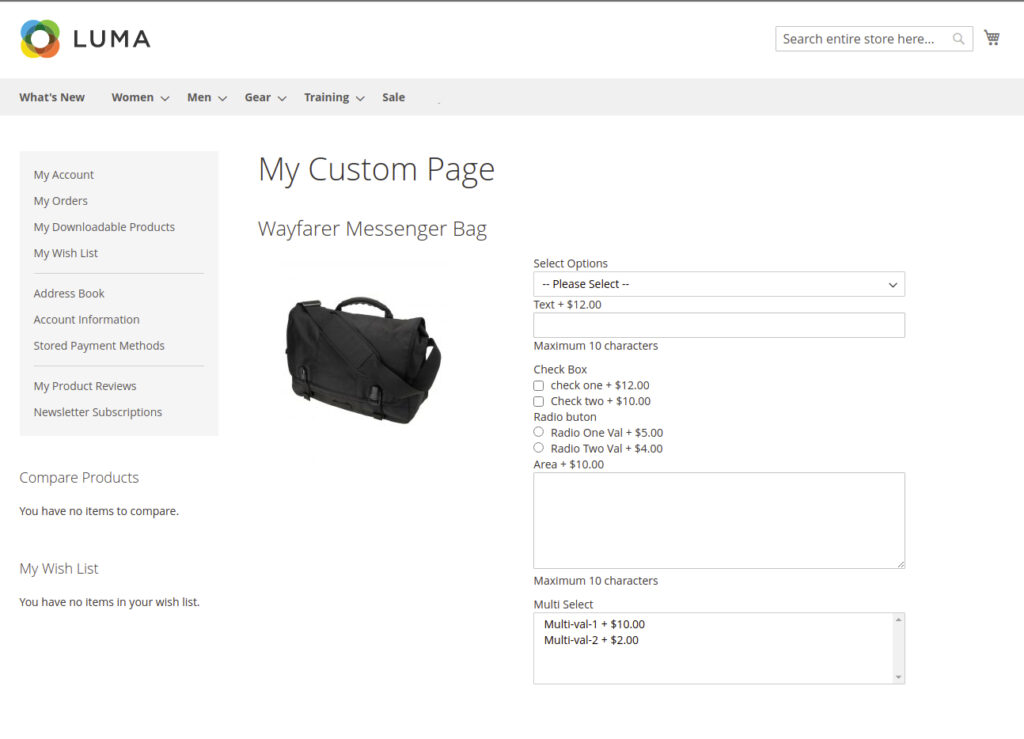I hope this helps you. For any doubts regarding this topic, please write your doubts in below comments section.
---
_View the original post at: [https://dolphinwebsolution.com/how-to-show-product-custom-option-into-custom-page-in-magento-2](https://dolphinwebsolution.com/how-to-show-product-custom-option-into-custom-page-in-magento-2)_
_Served as markdown by [Third Audience](https://github.com/third-audience) v3.5.3_
_Generated: 2026-08-26 06:14:48 UTC_