---
title: "How To Implement Field Dependency In System Configuration Magento 2"
url: "https://dolphinwebsolution.com/how-to-implement-field-dependency-in-system-configuration-magento-2"
date: "2022-02-16T16:57:36+05:30"
modified: "2023-08-25T08:49:53+05:30"
author:
name: "Jigar Patel"
categories:
- "Magento"
word_count: 835
reading_time: "5 min read"
summary: "The system.xml is a configuration file which is used to create configuration fields in Magento 2 System Configuration. You will need this if your module has some settings which the admin needs..."
description: "The system.xml is a configuration file which is used to create configuration fields in Magento 2 System Configuration. You will need this if your module..."
keywords: "field dependency,system configuration,system.xml,depends,if_module_enabled, Magento"
language: "en"
schema_type: "Article"
related_posts:
- title: "Region/State is not showing on shipping address box in checkout page"
url: "https://dolphinwebsolution.com/region-state-is-not-showing-on-shipping-address-box-in-checkout-page"
- title: "Magento 2.3.XX unable to serialize value and Failed to load the components errors on checkout"
url: "https://dolphinwebsolution.com/magento-2-3-xx-unable-to-serialize-value"
- title: "Magento 2 Display Image in Admin UI Grid"
url: "https://dolphinwebsolution.com/magento-2-display-image-in-admin-ui-component-grid"
---
# How To Implement Field Dependency In System Configuration Magento 2
_Published: February 16, 2022_
_Author: Jigar Patel_

The **system.xml** is a **configuration file** which is used to create configuration fields in **[Magento 2 System Configuration](https://dolphinwebsolution.com/how-to-add-custom-select-option-into-system-xml-magento-2)**. You will need this if your module has some settings which the admin needs to set. You can go to **`Store -> Setting -> Configuration`** to check how it look like.
Sometimes, other fields have a dependency on one field. If the extension is enabled, then it should show other options to configure from the same group. However, what if you need to display fields in admin configuration depending on other fields from different groups?
### Steps to Implement Field Dependency from Different Groups in Magento 2 System.xml
Implement the below code whenever you need to set dependency from different groups in **system.xml**.
```
separator-topdolphintabDolphin_InvoiceEmail::config_extensionMagento\Config\Model\Config\Source\EnabledisableDolphin_Walletrewardpoints11
```
Field node reference
**A -Tag can have the following children:**
- **label** Defines the label that is displayed in the frontend.
- **comment** Adds a comment below the group label. By using HTML can be applied.
- **tooltip** Another possible frontend element that also can be used to describe the meaning of this field. Will be displayed as a small icon beside the field.
- **hint** Displays additional information. Only available with specific frontend\_model.
- **frontend\_class** Adds a defined CSS class to the rendered section HTML element.
- **frontend\_model** Specifies a different frontend model to change the rendering and modify the output.
- **backend\_model** Specifies a different backend model to modify the configured values.
- **source\_model** Specifies a different source model that provides a specific set of values.
- **config\_path** Can be used to overwrite the generic config path of a field.
- **validate** Define different validation rules (comma separated). Full reference list of available validation rules is listed below.
- **can\_be\_empty** Used when type is multiselect to specify that a field can be empty.
- **if\_module\_enabled** Used to display a field only when a given module is enabled.
- **base\_url** Used in combination with upload\_dir for file uploads.
- **upload\_dir** Specify a target directory for uploads. This node has additional attributes and nodes. Look them up before using this.
- **button\_url** Displays a button if button\_url and button\_label are specified. Usually used in combination with a custom frontend model.
- **button\_label** Displays a button if button\_label and button\_url are specified. Usually used in combination with a custom frontend model.
- **hide\_in\_single\_store\_mode** Whether the group should be visible in single store mode. 1 hides the group; 0 shows the group.
- **source\_service** Service used to populate select options.
- **options** Not used. Potentially deprecated.
- **depends** Can be used to declare dependencies to other fields. Is used to only show specific fields/groups when a given field has a value of 1. This node expects a section/group/field-string.
- **attribute** Custom attributes can be used by frontend models. Usually used to make a given frontend model more dynamic.
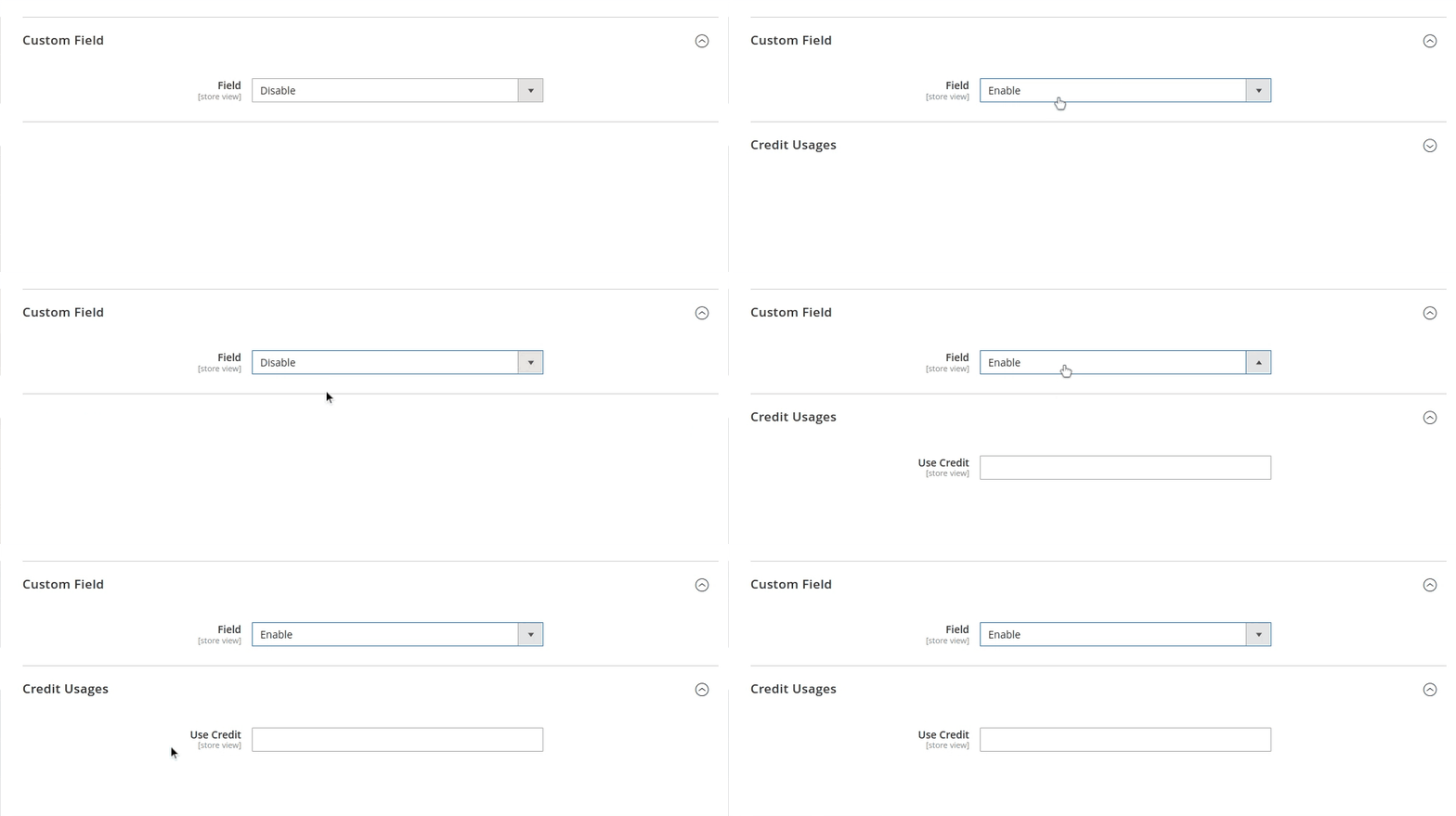
**Result:**
After you implement the above code, check output in the admin panel of Magento 2. The dependency fields will be displayed in the system configuration.
I Hope, This instruction will be helpful for you.
If you have any difficulties regarding this blog, do consider them posting in the Comments section below!
I’m here to help.
**Thank you!**
---
_View the original post at: [https://dolphinwebsolution.com/how-to-implement-field-dependency-in-system-configuration-magento-2](https://dolphinwebsolution.com/how-to-implement-field-dependency-in-system-configuration-magento-2)_
_Served as markdown by [Third Audience](https://github.com/third-audience) v3.5.3_
_Generated: 2026-08-26 06:14:15 UTC_