---
title: "How to create Custom Product Sliders Using hyva slider view modal in Hyva Magento 2 ?"
url: "https://dolphinwebsolution.com/how-to-create-custom-product-sliders-using-hyva-slider-view-modal-in-hyva-magento-2"
date: "2023-03-14T05:43:31+05:30"
modified: "2023-08-29T07:20:09+05:30"
author:
name: "Aadil Popatiya"
url: "https://dolphinwebsolution.com/"
categories:
- "Hyva"
word_count: 575
reading_time: "3 min read"
summary: "Hey folks, in the last blog we discussed How to create a product slider using layout. In this blog we are going to learn How to create a custom product slider using the hyva view modal in hyva mage..."
description: "Hey folks, in the last blog we discussed How to create a product slider using layout. In this blog we are going to learn How to create a custom product slide..."
keywords: "Hyva"
language: "en"
schema_type: "Article"
related_posts:
- title: "Hyvä Magento Theme: Stay Ahead in the E-Commerce Race by Hiring Hyvä Theme Developer"
url: "https://dolphinwebsolution.com/blog/stay-ahead-in-the-e-commerce-race-by-hiring-hyva-theme-developer/"
- title: "How to create Modal Dialog in Hyva Theme Magento 2"
url: "https://dolphinwebsolution.com/how-to-create-modal-dialog-in-hyva-theme-magento-2"
- title: "Reasons to Switch Hyvä Theme for Magento 2"
url: "https://dolphinwebsolution.com/blog/reasons-to-switch-hyva-theme-for-magento-2/"
---
# How to create Custom Product Sliders Using hyva slider view modal in Hyva Magento 2 ?
_Published: March 14, 2023_
_Author: Aadil Popatiya_

Hey folks, in the last blog we discussed How to create a product slider using layout. In this blog we are going to learn How to create a custom product slider using the hyva view modal in hyva magento 2. You can also use our [**Hyva theme development Service**](https://dolphinwebsolution.com/hyva-theme-development/) If you have difficulty.
Here are the steps to create custom product slider Using hyva slider view modal in Hyva Magento 2 :
## **Step 1** : Register your module
You can create a module as per the given instruction in the following link.
**Step 2** : Create your page layout
*app/code/Dolphin/CustomProductSlider/view/frontend/layout/hyva\_dolphin\_index\_index.xml*
```
```
## **Step 3** : Create Block Class
*app/code/Dolphin/CustomProductSlider/Block/SliderItems.php*
```
_productCollectionFactory = $productCollectionFactory;
parent::__construct($context, $data);
}
/**
* @return \Magento\Catalog\Model\ResourceModel\Product\Collection
*/
public function getProductCollection()
{
$collection = $this->_productCollectionFactory->create();
$collection->addAttributeToSelect('*');
$collection->setPageSize(12); // fetching only 12 products
return $collection;
}
}
```
## **Step 4** : Create Template
*app/code/Dolphin/CustomProductSlider/view/frontend/templates/product-slider.phtml*
```
require(\Hyva\Theme\ViewModel\Slider::class);
$items = $block->getProductCollection(); // a collection or array of items to render
$itemTemplate = 'Magento_Catalog::product/list/item.phtml';
$containerTemplate = 'Magento_Catalog::product/slider/product-slider-container.phtml';
?>
getSliderForItems($itemTemplate, $items, $containerTemplate)
->setData('title', $escaper->escapeHtml(__('Custom Product Slider')))
->toHtml();
?>
```
The **$sliderViewModel** variable is used to instantiate the Slider ViewModel from the Hyva theme. This ViewModel contains logic for creating a slider based on a collection or array of items.
The **$items** variable is populated with a collection or array of product items to render in the slider.
The $**itemTemplate** variable is set to the path of the PHTML template that will be used to render each individual product item in the slider.
The **$containerTemplate** variable is set to the path of the PHTML template that will be used to render the container for the slider.
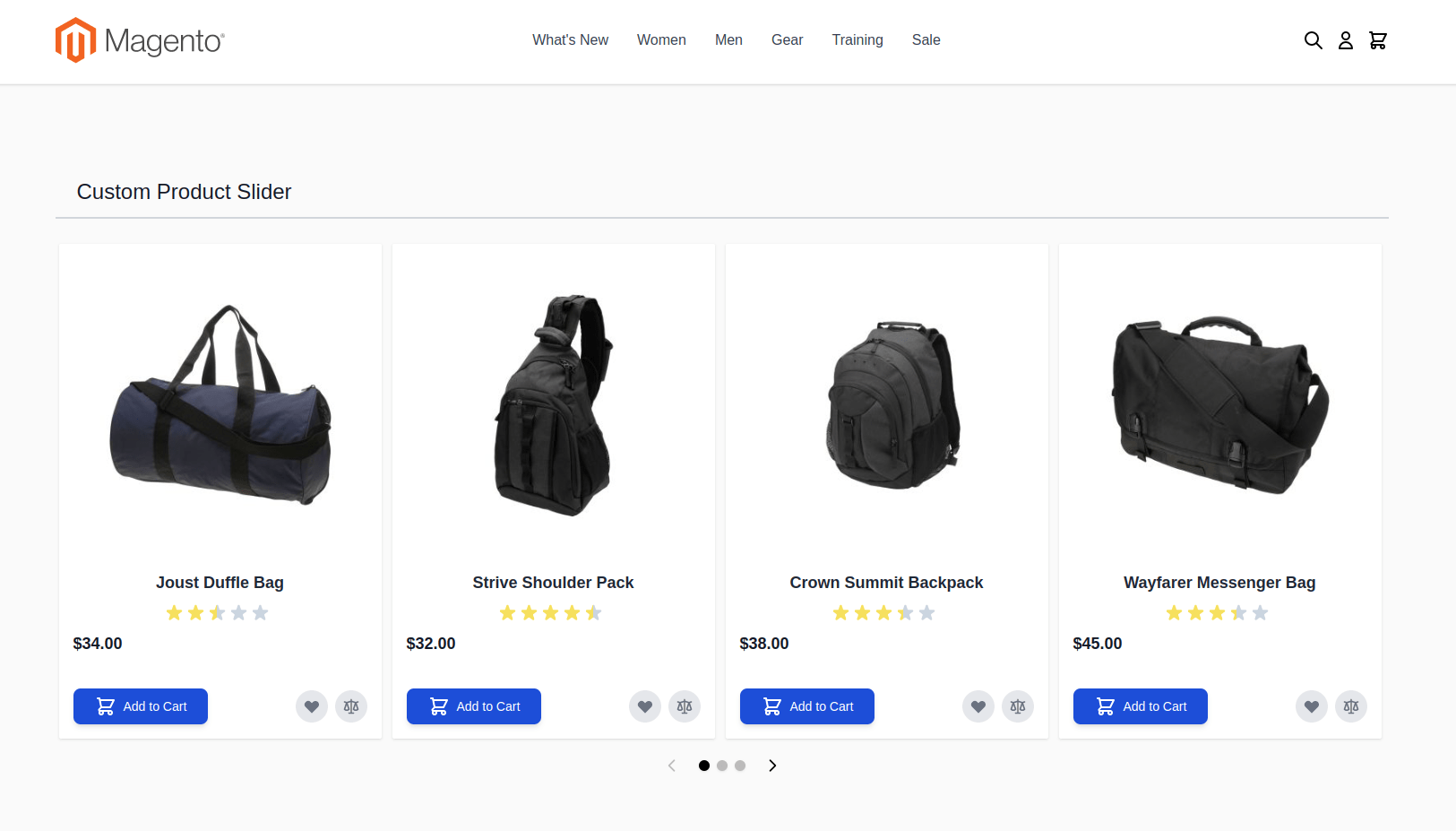
Finally, the **$sliderHtml** variable is populated by calling the **getSliderForItems()** method on the **$sliderViewModel** object, passing in the **$itemTemplate**, **$items**, and **$containerTemplate** variables. The resulting HTML output is then escaped and displayed on the page, along with a title for the slider.
The final result will look like this.
[](https://dolphinwebsolution.com/wp-content/uploads/2023/03/blog-product-slider.png)
And that’s it! This is how you can create product sliders using hyva slider view modal in Hyva Magento 2.
If you’re struggling with any questions or confusion regarding custom product sliders in Magento 2, feel free to reach out to us through the comments section. We’re always happy to assist and provide the guidance you need.
---
_View the original post at: [https://dolphinwebsolution.com/how-to-create-custom-product-sliders-using-hyva-slider-view-modal-in-hyva-magento-2](https://dolphinwebsolution.com/how-to-create-custom-product-sliders-using-hyva-slider-view-modal-in-hyva-magento-2)_
_Served as markdown by [Third Audience](https://github.com/third-audience) v3.5.3_
_Generated: 2026-08-26 06:36:47 UTC_