---
title: "How to Create Custom Category Attribute In Magento 2"
url: "https://dolphinwebsolution.com/how-to-create-custom-category-attribute-in-magento-2"
date: "2021-07-17T07:46:18+05:30"
modified: "2023-08-28T05:39:25+05:30"
author:
name: "Mahesh Makwana"
categories:
- "Magento"
word_count: 662
reading_time: "4 min read"
summary: "We learn how to create custom category attributes using InstallData.php in Magento 2. When we develop modules or themes we need some custom attributes in category form for some requirements. We can..."
description: "We learn how to create custom category attributes using InstallData.php in Magento 2. When we develop modules or themes we need some custom attributes in cat..."
keywords: "create custom category attribute,create custom category attribute magento 2,create custom category attribute in magento, Magento"
language: "en"
schema_type: "Article"
related_posts:
- title: "How to Create Cron Job Programmatically in magento 2"
url: "https://dolphinwebsolution.com/how-to-create-cron-job-programmatically-in-magento-2"
- title: "How to add additional text based on selected shipping methods in the checkout"
url: "https://dolphinwebsolution.com/how-to-add-additional-text-based-on-selected-shipping-methods-in-the-checkout"
- title: "How to override template file using helper function in Magento2"
url: "https://dolphinwebsolution.com/how-to-override-template-file-using-helper-function-in-magento2"
---
# How to Create Custom Category Attribute In Magento 2
_Published: July 17, 2021_
_Author: Mahesh Makwana_

We learn how to create custom category attributes using InstallData.php in Magento 2. When we develop modules or themes we need some custom attributes in category form for some requirements. **We can add different type of category attribute like toggle, select, text, WYSIWYG editor etc. type files in Category form.**
We used the InstallData.php file for creating custom category attributes. InstallData.php file places at your module path **app/code/VendoreName/ModuleName/Setup/InstallData.php**. This file executes only once when our module is installing the first time. After the module is successfully installed InstallData.php file does not execute. **It means the InstallData.php file only executes once while the module first time installed.**
If you don’t know about InstallData.php then [click here](https://dolphinwebsolution.com/how-to-create-install-upgrade-uninstall-script-in-magento-2)
#### Here, we creating one custom toggle input in Category Form
- **Step-1:** Create **registration.php** at **app/code/Dolphin/CategoryAttribute**
```
```
- **Step-3:** Create **InstallData.php** at **app/code/Dolphin/CategoryAttribute/Setup**
```
eavSetupFactory = $eavSetupFactory;
}
public function install(ModuleDataSetupInterface $setup, ModuleContextInterface $context)
{
$setup->startSetup();
$eavSetup = $this->eavSetupFactory->create(['setup' => $setup]);
/* Remove Category Attribute */
$eavSetup->removeAttribute(\Magento\Catalog\Model\Category::ENTITY, 'custom_toggle');
/* Add Category Attribute */
$eavSetup->addAttribute(
\Magento\Catalog\Model\Category::ENTITY,
'custom_toggle',
[
'type' => 'int',
'label' => 'Custom Toggle',
'input' => 'boolean',
'source' => Boolean::class,
'visible' => true,
'required' => false,
'global' => \Magento\Eav\Model\Entity\Attribute\ScopedAttributeInterface::SCOPE_STORE,
'group' => 'General Information',
'default' => '0',
]
);
$setup->endSetup();
}
}
```
- **Step-4:** Create **category\_form.xml** at **app/code/Dolphin/CategoryAttribute/view/adminhtml/ui\_component**
```
```
**So after you create the above files Please run Magento commands**
```
php bin/magento setup:upgrade
php bin/magento setup:static-content:deploy -f
php bin/magento cache:clean
```
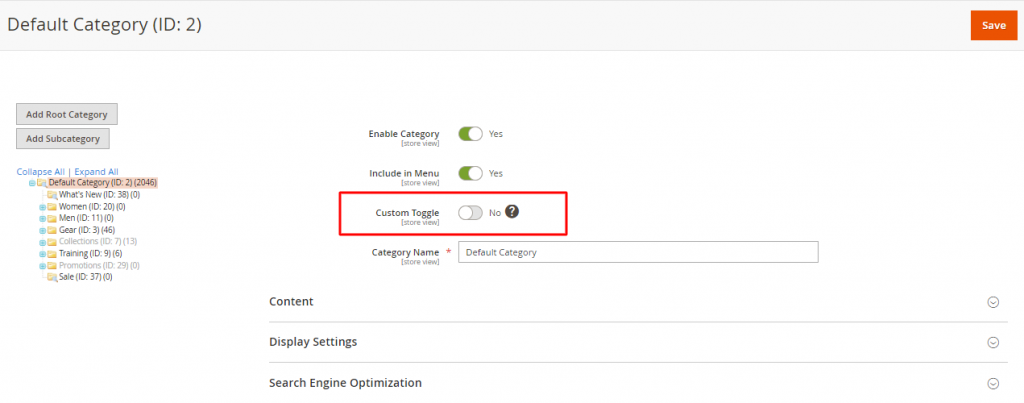
**Check you category form in the admin panel you can show custom toggle attribute like below.**
I hope this helps you. For any doubts regarding this topic, please write your doubts in the comments section.
---
_View the original post at: [https://dolphinwebsolution.com/how-to-create-custom-category-attribute-in-magento-2](https://dolphinwebsolution.com/how-to-create-custom-category-attribute-in-magento-2)_
_Served as markdown by [Third Audience](https://github.com/third-audience) v3.5.3_
_Generated: 2026-08-26 06:54:01 UTC_