---
title: "How To Add Extra Pricing Data In product_data_storage"
url: "https://dolphinwebsolution.com/how-to-add-extra-pricing-data-in-product_data_storage"
date: "2022-10-15T16:38:21+05:30"
modified: "2023-08-24T09:52:00+05:30"
author:
name: "Jigar Patel"
categories:
- "Magento"
word_count: 723
reading_time: "4 min read"
summary: "The frontend product repository uses the product_data_storage section of the data storage cache as its data source. This section is responsible for holding all product data that comes from the serv..."
description: "The frontend product repository uses the product_data_storage section of the data storage cache as its data source. This section is responsible for holding a..."
keywords: "product_data_storage,price,product,repository,Local Storage, Magento"
language: "en"
schema_type: "Article"
related_posts:
- title: "Top 10 Reasons to Why You Should Choose Magento for eCommerce"
url: "https://dolphinwebsolution.com/magento-for-ecommerce-top-10-reasons-as-to-why-you-should-choose-it"
- title: "Create, Update and Remove Custom Category Attributes Using UpgradeData.php In Magento 2"
url: "https://dolphinwebsolution.com/create-update-and-remove-custom-category-in-magento-2"
- title: "How To Setup Cron Time In Magento 2 System Configuration"
url: "https://dolphinwebsolution.com/how-to-setup-cron-time-in-magento-2-system-configuration"
---
# How To Add Extra Pricing Data In product_data_storage
_Published: October 15, 2022_
_Author: Jigar Patel_

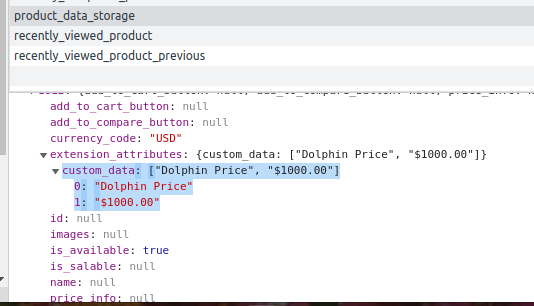
The frontend product repository uses the **`product_data_storage`** section of the data storage cache as its data source. This section is responsible for holding all product data that comes from the server when a customer visits a product page.
Check this file **`vendor/magento/module-catalog/CustomerData/ProductsRenderInfoSection.php`** In this file, they are calling **`getList`** the method which processes on product’s data, And based on it Magento adding **`product_data_storage`** and for the price, Magento has used **`vendor/magento/module-catalog/Ui/DataProvider/Product/Listing/Collector/Price.php`** and **`vendor/magento/module-tax/Ui/DataProvider/Product/Listing/Collector/Tax.php`** but it is not updating the price on the front side.
If you want to change the full data of product\_data\_storage you can call your class instead of **`Magento\Catalog\CustomerData\ProductsRenderInfoSection`** as Magento has called in **`vendor/magento/module-catalog/etc/frontend/di.xml`** a file like below.
```
- Magento\Catalog\CustomerData\RecentlyViewedProductsSection
- Magento\Catalog\CustomerData\RecentlyComparedProductsSection
- Magento\Catalog\CustomerData\ProductsRenderInfoSection
```
### Steps To Add Extra Pricing Data In product\_data\_storage
We are already learned [how to create a basic module in Magento 2](https://dolphinwebsolution.com/how-to-create-module-in-magento-2). We need to create **module.xml** and **registration.php** files. You can create **module.xml** and **registration.php** from this tutorial.
Here we are using **Dolphin** as the Vendor name and **Price** as the name of the module. You can change this according to your Vendor and Module name.
#### Step 1: Create an Extension Attribute file
Create an extension attribute file **`extension_attributes`.xml** in **app/code/Dolphin/Price/etc** folder with the following code.
```
```
#### Step 2: Create Dependency injection
Create dependency injection file **di.xml** in the **app/code/Dolphin/Price/etc/frontend** folder with the following code.
```
- \Dolphin\Price\Ui\DataProvider\Product\Listing\Collector\CustomData
```
#### Step 3: Create a class file for DataProvider
Create Class file **CustomData.php** in the **app/code/Dolphin/Recently/Ui/DataProvider/Product/Listing/Collector** folder with the following code.
```
productRenderExtensionFactory = $productRenderExtensionFactory;
}
/**
* @param ProductInterface $product
* @param ProductRenderInterface $productRender
*/
public function collect(ProductInterface $product, ProductRenderInterface $productRender)
{
/** @var \Magento\Catalog\Api\Data\ProductRenderExtensionInterface $extensionAttributes */
$extensionAttributes = $productRender->getExtensionAttributes();
if (!$extensionAttributes) {
$extensionAttributes = $this->productRenderExtensionFactory->create();
}
$extensionAttributes->setCustomData([
'Dolphin Price',
'$1000.00'
]);
$productRender->setExtensionAttributes($extensionAttributes);
}
}
```
Now execute the below command and go to the system configuration page:
\[dt\_highlight color=”” text\_color=”” bg\_color=””\]php bin/magento setup:upgrade\[/dt\_highlight\]
\[dt\_highlight color=”” text\_color=”” bg\_color=””\]php bin/magento setup:static-content:deploy -f\[/dt\_highlight\]
\[dt\_highlight color=”” text\_color=”” bg\_color=””\]php bin/magento cache:flush\[/dt\_highlight\]
**Result:**
I Hope, This instruction will be helpful for you.
**Happy Coding with magento2!! ?**
If you have any difficulties regarding this blog, do consider them posting in the Comments section below!
I’m here to help.
Thank you!
---
_View the original post at: [https://dolphinwebsolution.com/how-to-add-extra-pricing-data-in-product_data_storage](https://dolphinwebsolution.com/how-to-add-extra-pricing-data-in-product_data_storage)_
_Served as markdown by [Third Audience](https://github.com/third-audience) v3.5.3_
_Generated: 2026-08-26 06:13:54 UTC_