---
title: "How to Add Custom Tab in Product Page Magento 2"
url: "https://dolphinwebsolution.com/how-to-add-custom-tab-in-product-page-magento-2"
date: "2021-07-13T16:59:26+05:30"
modified: "2023-08-24T10:05:41+05:30"
author:
name: "Jayesh Makwana"
categories:
- "Magento"
word_count: 731
reading_time: "4 min read"
summary: "In this article. we will add custom tab, remove, rename, and reorder the tab on the product page. Two different ways to add tabs you can add with a custom module or custom theme. You can choose any..."
description: "In this article. we will add custom tab, remove, rename, and reorder the tab on the product page. Two different ways to add tabs you can add with a custom mo..."
keywords: "Add Custom Tab,Add Custom Tab in product page,Add Custom Tab in magento,Add Custom Tab to Magento 2, Magento"
language: "en"
schema_type: "Article"
related_posts:
- title: "Download Files in Magento 2"
url: "https://dolphinwebsolution.com/how-to-download-files-in-magento-2"
- title: "How to create Install, Upgrade, Uninstall Script in Magento 2"
url: "https://dolphinwebsolution.com/how-to-create-install-upgrade-uninstall-script-in-magento-2"
- title: "Magento 2 Add Custom Validation Checkout"
url: "https://dolphinwebsolution.com/magento-2-add-custom-validation-checkout"
---
# How to Add Custom Tab in Product Page Magento 2
_Published: July 13, 2021_
_Author: Jayesh Makwana_

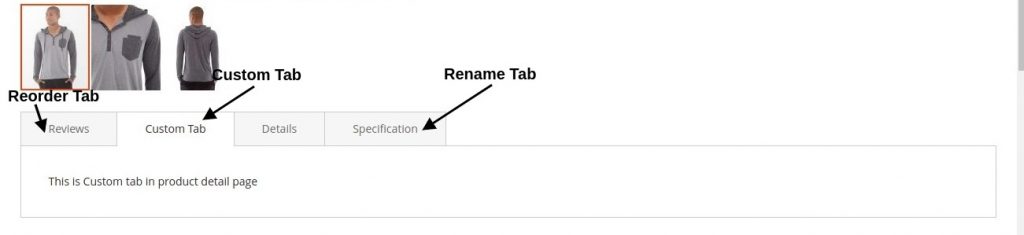
In this article. we will add custom tab, remove, rename, and reorder the tab on the product page. Two different ways to add tabs you can add with a custom module or custom theme. You can choose anyone and go on!
### Add Custom Tab
**Step 1**: create a file **catalog\_product\_view.xml** at
For module : /**app/code/Dolphin/CustomModule/view/frontend/layout**
For theme : ***/app/design/frontend/Dolphin/custom\_theme/Magento\_Catalog/layout*** and paste the below code:
```
Custom Tab
```
**Step 2:**[ Create a template file](https://dolphinwebsolution.com/how-to-create-block-layouts-and-templates-magento-2) **custom\_tab.phtml** at
For moduel : /**app/code/Dolphin/CustomModule/view/frontend/templates/**
For theme : ***/app/design/frontend/Dolphin/custom\_theme/Magento\_Catalog/templates*** and paste the below code:
```
```
### Rename tab name
Override the base layout file **catalog\_product\_view.xml** and paste the below code:
```
Raname Tab
```
### Remove tab
```
Override the base layout file catalog_product_view.xml and paste the below code:
```
### Reorder Tab
Override the base [layout file ](https://devdocs.magento.com/guides/v2.4/frontend-dev-guide/layouts/xml-instructions.html)**catalog\_product\_view.xml** and paste the below code:
```
1
```
Just analyse the code for Rename, reorder and remove we’ll see that the first layout handler
**** reference our product tabbed navigation as a whole while the child handler **** reference single tab, in our case details tab. With **** or **1**
we simply set new title for our tab. **** handler is just a (required) container for **** and it does’t have it’s own attributes.
#### Conclusion
As you can look from these simple examples, it’s easy to customize product page tabbed navigation. Apply some CSS for styling and you’ll have your new tabs with new customized content a couple of times.
**You may also like to read**
- [Add custom Product image](https://dolphinwebsolution.com/how-to-add-custom-product-image-role-in-magento-2)
- [Add custom validation checkout](https://dolphinwebsolution.com/magento-2-add-custom-validation-checkout)
**That’s it!**
I hope this technical blog will help you to find what you were looking for.
That’s all, If you have any further questions about Magento 2 theme development or if need any help from our [Magento 2 expert](https://dolphinwebsolution.com/hire-magento-developer/), contact us now for a free consultation.
**Bookmark** it for your future reference. Do comment below if you have any other questions.
**P.S.** Do share this note with your team.
---
_View the original post at: [https://dolphinwebsolution.com/how-to-add-custom-tab-in-product-page-magento-2](https://dolphinwebsolution.com/how-to-add-custom-tab-in-product-page-magento-2)_
_Served as markdown by [Third Audience](https://github.com/third-audience) v3.5.3_
_Generated: 2026-08-26 06:55:11 UTC_