---
title: "How to Add Color Picker in Magento 2 Admin Configuration"
url: "https://dolphinwebsolution.com/how-to-add-color-picker-in-magento-2"
date: "2021-03-25T05:26:17+05:30"
modified: "2023-08-24T09:32:50+05:30"
author:
name: "Mahesh Makwana"
categories:
- "Magento"
word_count: 448
reading_time: "3 min read"
summary: "We learn how to add color picker in Magento 2 system configuration using the system.xml file.
In Magento 2, there are many times we need to add color dynamic from system configuration which admi..."
description: "We learn how to add color picker in Magento 2 system configuration using the system.xml file. In Magento 2, there are many times we need to add color dynamic..."
keywords: "add color picker in magento 2, Magento"
language: "en"
schema_type: "Article"
related_posts:
- title: "How to Magento 2 Reindex one Product Programmatically?"
url: "https://dolphinwebsolution.com/how-to-magento-2-reindex-one-product-programmatically"
- title: "Add condition field like Catalog Price Rule in custom Ui-component Form Magento 2 [Part-1]"
url: "https://dolphinwebsolution.com/add-condition-field-like-catalog-price-rule-in-custom-ui-component-form-magento-2/"
- title: "Dependent Fields In UI-Component Forms In Magento 2"
url: "https://dolphinwebsolution.com/dependent-fields-in-ui-component-forms-in-magento-2"
---
# How to Add Color Picker in Magento 2 Admin Configuration
_Published: March 25, 2021_
_Author: Mahesh Makwana_

We learn how to add color picker in [Magento 2 system configuration](https://dolphinwebsolution.com/shop/configurable-products-preselect-for-magento.html) using the system.xml file.
In Magento 2, there are many times we need to add color dynamic from system configuration which admin can set the value. This provides the admin to choose the color which one wants to show. So now add color picker into system configuration follow below steps:
- **Step-1:** Create **adminhtml\_system\_config\_edit.xml** at **app/code/Dolphin/ColorePickerDemo/view/adminhtml/layout**
```
```
- **Step-2:** Create **system.xml** at **app/code/Dolphin/ColorePickerDemo/etc/adminhtml**
```
separator-topdolphinDolphin_ColorePickerDemo::colorepickerdemo_configDolphin\ColorePickerDemo\Block\Color
```
- **Step-3:** Create **Color.php** at **app/code/Dolphin/ColorePickerDemo/Block**
```
getElementHtml();
$value = $element->getData('value');
$html .= '';
return $html;
}
}
```
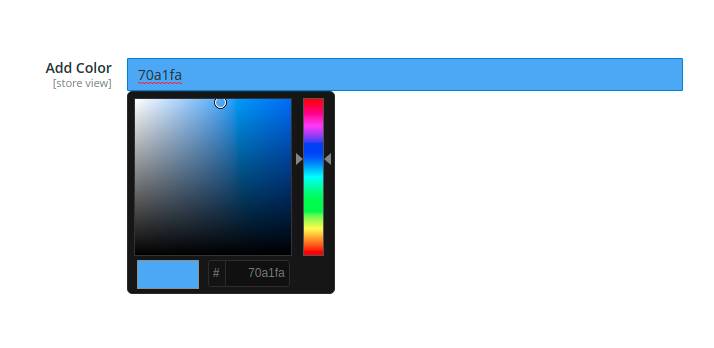
Here the above block returns javascript from the **‘\_[ElementHtml](https://docs.magento.com/user-guide/cms/page-builder-elements-html-code.html)’** method. This block is responsible for showing color pickers.
#### OUTPUT:
I hope this helps you. For any doubts regarding this topic, please write your doubts in the comments section.
---
_View the original post at: [https://dolphinwebsolution.com/how-to-add-color-picker-in-magento-2](https://dolphinwebsolution.com/how-to-add-color-picker-in-magento-2)_
_Served as markdown by [Third Audience](https://github.com/third-audience) v3.5.3_
_Generated: 2026-08-26 06:55:03 UTC_