---
title: "How to Add a Custom field at Product Form Magento 2"
url: "https://dolphinwebsolution.com/how-to-add-a-custom-field-at-product-form-page-magento-2"
date: "2021-07-06T09:10:27+05:30"
modified: "2023-08-29T07:15:36+05:30"
author:
name: "Mahesh Makwana"
categories:
- "Magento"
word_count: 1592
reading_time: "8 min read"
summary: "We learn how to add a custom field at Product Form in Magento 2. Magento already supports additional product attributes via an inbuilt EAV model. Many developers need to add custom filed/fieldset i..."
description: "We learn how to add a custom field at Product Form in Magento 2. Magento already supports additional product attributes via an inbuilt EAV model. Many develo..."
keywords: "custom field,add custom field,custom field at product,custom field at product form,custom field at product form magento 2,product form magento 2, Magento"
language: "en"
schema_type: "Article"
related_posts:
- title: "How to Customize Email Templates in Magento 2"
url: "https://dolphinwebsolution.com/how-to-customize-email-templates-in-magento-2"
- title: "How to Get System Configurations All CMS Pages In Magento 2"
url: "https://dolphinwebsolution.com/how-to-get-system-configurations-all-cms-pages-in-magento-2-2"
- title: "How to Add Custom Tab in Product Page Magento 2"
url: "https://dolphinwebsolution.com/how-to-add-custom-tab-in-product-page-magento-2"
---
# How to Add a Custom field at Product Form Magento 2
_Published: July 6, 2021_
_Author: Mahesh Makwana_

We learn how to add a custom field at Product Form in Magento 2. Magento already supports additional product attributes via an inbuilt EAV model. Many developers need to add custom filed/fieldset in product form. And also there are need more modification of our custom fields. This is more demand when you use extra information on the product page which Magento 2 is not provided in default.
Feel free to contack us If you want [**hire certified Magento developer**](https://dolphinwebsolution.com/hire-magento-2-developers/).
#### Let’s follow below step to add a custom field to Product Form.
First We create a basic module if you don’t know then [click here.](https://dolphinwebsolution.com/how-to-create-module-in-magento-2)
- **Step-1:** Create **registration.php** at **app/code/Dolphin/CustomProductField**
```
```
- **Step-3:** Now we create custom product attributes. Create **InstallData.php** at **app/code/Dolphin/CustomProductField/Setup**
```
eavSetupFactory = $eavSetupFactory;
}
public function install(ModuleDataSetupInterface $setup, ModuleContextInterface $context)
{
$eavSetup = $this->eavSetupFactory->create(['setup' => $setup]);
/* Product Custom Title */
$eavSetup->removeAttribute(\Magento\Catalog\Model\Product::ENTITY, 'custom_title');
$eavSetup->addAttribute(
\Magento\Catalog\Model\Product::ENTITY,
'custom_title',
[
'type' => 'varchar',
'label' => 'Custom Title',
'input' => 'text',
'required' => false,
'sort_order' => 10,
'global' => \Magento\Eav\Model\Entity\Attribute\ScopedAttributeInterface::SCOPE_STORE,
'group' => 'custom_content_hide',
'backend' => 'Magento\Eav\Model\Entity\Attribute\Backend\ArrayBackend',
]
);
/* Product Custom Select Options */
$eavSetup->removeAttribute(\Magento\Catalog\Model\Product::ENTITY, 'custom_mode');
$eavSetup->addAttribute(
\Magento\Catalog\Model\Product::ENTITY,
'custom_mode',
[
'type' => 'varchar',
'label' => 'Custom Select Option',
'input' => 'select',
'required' => false,
'sort_order' => 20,
'source' => \Dolphin\CustomProductField\Model\Config\Source\CustomModeList::class,
'global' => \Magento\Eav\Model\Entity\Attribute\ScopedAttributeInterface::SCOPE_STORE,
'group' => 'custom_content_hide',
]
);
/* Product Custom Multi Select Option */
$eavSetup->removeAttribute(\Magento\Catalog\Model\Product::ENTITY, 'custom_cms_pages');
$eavSetup->addAttribute(
\Magento\Catalog\Model\Product::ENTITY,
'custom_cms_pages',
[
'type' => 'varchar',
'label' => 'Custom CMS Pages',
'input' => 'multiselect',
'required' => false,
'sort_order' => 30,Screenshot
'source' => \Dolphin\CustomProductField\Model\Config\Source\CMSPageList::class,
'global' => \Magento\Eav\Model\Entity\Attribute\ScopedAttributeInterface::SCOPE_STORE,
'backend' => 'Magento\Eav\Model\Entity\Attribute\Backend\ArrayBackend',
'group' => 'custom_content_hide',
]
);
}
}
```
If you need to add to your existing module then you should use [UpgradeData](https://dolphinwebsolution.com/how-to-create-install-upgrade-uninstall-script-in-magento-2). Don’t forget to change your module version before using UpgradeData.
- **Step-4:** Create **CustomModeList.php** at **app/code/Dolphin/CustomProductField/Model/Config/Source**
```
getOptions();
array_unshift($res, ['value' => '', 'label' => '']);
return $res;
}
public function getOptions()
{
$res = [];
foreach ($this->getOptionArray() as $index => $value) {
$res[] = ['value' => $index, 'label' => $value];
}
return $res;
}
public function toOptionArray()
{
return $this->getOptions();
}
}
```
- **Step-5:** Create **CMSPageList.php** at **app/code/Dolphin/CustomProductField/Model/Config/Source**
```
pageFactory = $pageFactory;
$this->pageRepositoryInterface = $pageRepositoryInterface;
$this->searchCriteriaBuilder = $searchCriteriaBuilder;
}
public function getOptionArray()
{
$searchCriteria = $searchCriteria = $this->searchCriteriaBuilder->create();
$pages = $this->pageRepositoryInterface->getList($searchCriteria)->getItems();
$options = [];
foreach ($pages as $page) {
$pageData = $this->pageFactory->create();
$categoryIds = $pageData->load($page->getId());
$options[$page->getId()] = $page->getTitle();
}
return $options;
}
public function getAllOptions()
{
$res = $this->getOptions();
array_unshift($res, ['value' => '', 'label' => '']);
return $res;
}
public function getOptions()
{
$res = [];
foreach ($this->getOptionArray() as $index => $value) {
$res[] = ['value' => $index, 'label' => $value];
}
return $res;
}
public function toOptionArray()
{
return $this->getOptions();
}
}
```
**After creating and adding above files run magento 2 commands**
```
php bin/magento setup:upgrade
php bin/magento setup:static-content:deploy -f
php bin/magento cache:clean
```
**You can show custom attributes in product form like Below:**
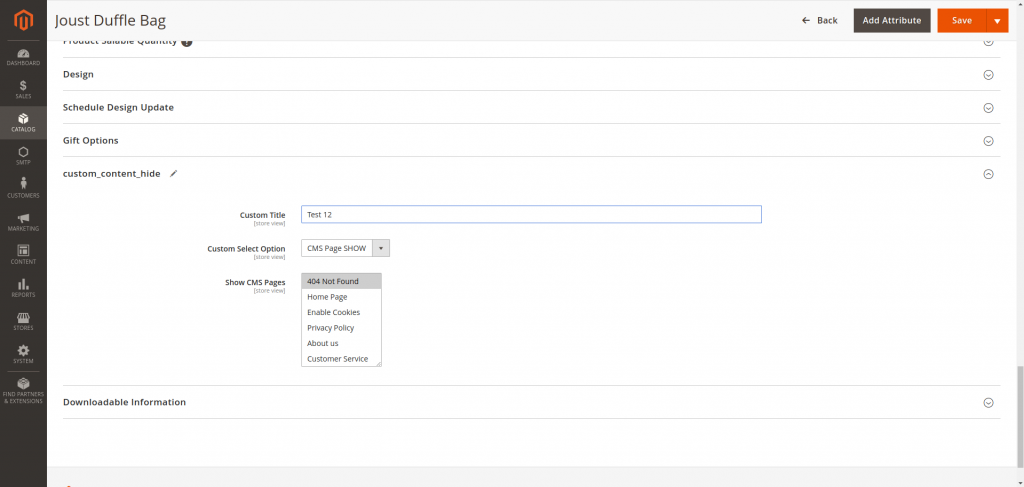
**Now We modify the custom fieldset and field into Product From using Magento\\Catalog\\Ui\\DataProvider\\Product\\Form\\Modifier\\Pool.**
- **Step-6:** Create **di.xml** at **app/code/Dolphin/CustomProductField/etc/adminhtml**
```
-
- Dolphin\CustomProductField\Ui\DataProvider\Product\Form\Modifier\CustomContent
- 40
```
- **Step-7:** Create **CustomContent.php** at **app/code/Dolphin/CustomProductField/Ui/DataProvider/Product/Form/Modifier**
```
modeList = $modeList;
$this->pageList = $pageList;
$this->locator = $locator;
}
public function modifyMeta(array $meta)
{
$meta = array_replace_recursive(
$meta,
[
'custom_content' => [
'arguments' => [
'data' => [
'config' => [
'label' => __('Custom Content'),
'componentType' => Fieldset::NAME,
'dataScope' => 'data.product',
'collapsible' => true,
'sortOrder' => 5,
],
],
],
'children' => [
'custom_title' => $this->getCustomTitle(),
'custom_mode' => $this->getCustomMode(),
'custom_cms_pages' => $this->getCustomCmsPages(),
],
],
]
);
/* Hide Custom Content Attributes */
if (isset($meta['custom-content-hide'])) {
unset($meta['custom-content-hide']);
}
return $meta;
}
public function getCustomTitle()
{
return [
'arguments' => [
'data' => [
'config' => [
'label' => __('Custom Title'),
'componentType' => Field::NAME,
'formElement' => Input::NAME,
'dataScope' => 'custom_title',
'dataType' => Text::NAME,
'sortOrder' => 10,
],
],
],
];
}
public function getCustomMode()
{
return [
'arguments' => [
'data' => [
'config' => [
'label' => __('Custom Mode Options'),
'component' => 'Dolphin_CustomProductField/js/form/element/custom-mode-list',
'componentType' => Field::NAME,
'formElement' => Select::NAME,
'dataScope' => 'custom_mode',
'dataType' => Text::NAME,
'sortOrder' => 20,
'options' => $this->getCustomModeOptions(),
],
],
],
];
}
public function getCustomCmsPages()
{
return [
'arguments' => [
'data' => [
'config' => [
'label' => __('Custom CMS Pages'),
'componentType' => Field::NAME,
'component' => 'Magento_Catalog/js/components/new-category',
'elementTmpl' => 'ui/grid/filters/elements/ui-select',
'levelsVisibility' => 1,
'disableLabel' => true,
'formElement' => MultiSelect::NAME,
'dataScope' => 'custom_cms_pages',
'chipsEnabled' => true,
'dataType' => Text::NAME,
'sortOrder' => 30,
'required' => 1,
'options' => $this->getCustomCmsOptions(),
'validation' => ['required-entry' => 1],
],
],
],
];
}
public function getCustomModeOptions()
{
return $this->modeList->toOptionArray();
}
public function getCustomCmsOptions()
{
return $this->pageList->toOptionArray();
}
public function modifyData(array $data)
{
$product = $this->locator->getProduct();
$productId = (int) $product->getId();
$cmsPages = [];
$cmsCategoryIds = '';
if ($product->getCustomCmsPages()) {
$cmsPages = array_map('intval', explode(',', $product->getCustomCmsPages()));
}
if ($product->getCmsCategoryIds()) {
$cmsCategoryIds = $product->getCmsCategoryIds();
}
$data = array_replace_recursive(
$data, [
$productId => [
'product' => [
'custom_title' => $product->getCustomTitle(),
'custom_mode' => $product->getCustomMode(),
'custom_cms_pages' => $cmsPages,
],
],
]);
return $data;
}
}
```
- **Step-8:** Create [**custom-mode-list.js**](https://experienceleague.adobe.com/docs/commerce-learn/tutorials/frontend-development/add-javascript-module.html) at **app/code/Dolphin/CustomProductField/view/adminhtml/web/js/form/element**
```
define([
'jquery',
'underscore',
'uiRegistry',
'Magento_Ui/js/form/element/select'
], function ($, _, uiRegistry, select) {
'use strict';
return select.extend({
initialize: function (){
this._super();
var customMode = this._super().initialValue;
setTimeout(function () {
var customCMSPages = uiRegistry.get('index = custom_cms_pages');
if (customMode == 1) {
customCMSPages.show();
} else{
customCMSPages.hide();
}
}, 1000);
return this;
},
/**
* On value change handler.
*
* @param {String} value
*/
onUpdate: function (value) {
this.fieldDepend(value);
return this._super();
},
/**
* Update field dependency
*
* @param {String} value
*/
fieldDepend: function (value) {
setTimeout(function () {
var customCMSPages = uiRegistry.get('index = custom_cms_pages');
if (value == 1) {
customCMSPages.show();
} else {
customCMSPages.hide();
}
}, 500);
return this;
}
});
});
```
**Now please run PHP bin/Magento cache:clean command and refresh product form.**
**You can see custom fieldset and fields in product form like below.**

You can also modify existing form fieldset and field. **In CustomContent.php at Dolphin\\CustomProductField\\Ui\\DataProvider\\Product\\Form\\Modifier file, there are two main methods.**
1. **modifyMeta($meta):** This method allows you to add and modify **fieldset and fields** in Product Form. Here the whole product goes into **$meta** variable, which variable we use for adding and modifying Product Form.
2. **modifyData($data):-** This method allows you to **save and modifying form Data**. In this method, **Magento\\Catalog\\Model\\Locator\\LocatorInterface** class provides your current product data by using **$this->locator->getProduct()** method which helps you to get and show product data.
I hope this helps you. For any doubts regarding this topic, please write your doubts in the comments section.
---
_View the original post at: [https://dolphinwebsolution.com/how-to-add-a-custom-field-at-product-form-page-magento-2](https://dolphinwebsolution.com/how-to-add-a-custom-field-at-product-form-page-magento-2)_
_Served as markdown by [Third Audience](https://github.com/third-audience) v3.5.3_
_Generated: 2026-08-26 06:55:35 UTC_