---
title: "Dependent Fields In UI-Component Forms In Magento 2"
url: "https://dolphinwebsolution.com/dependent-fields-in-ui-component-forms-in-magento-2"
date: "2021-08-01T06:51:40+05:30"
modified: "2023-08-31T05:15:55+05:30"
author:
name: "Mahesh Makwana"
categories:
- "Magento"
word_count: 2017
reading_time: "11 min read"
summary: "There are many times we need some form fields are hide and show dependents on other form fields. These dependent form fields provide user fill only require data in the form. In UI-component, we man..."
description: "There are many times we need some form fields are hide and show dependents on other form fields. These dependent form fields provide user fill only require d..."
keywords: "UI-Component Form,UI-Component Forms In Magento 2,Dependent Fields,Dependent Fields In UI-Component,Dependent Fields in magento 2, Magento"
language: "en"
schema_type: "Article"
related_posts:
- title: "How to get store config values by scope in Magento 2"
url: "https://dolphinwebsolution.com/how-to-get-store-config-values-by-scope-in-magento-2"
- title: "How to Download Csv File in Magento 2"
url: "https://dolphinwebsolution.com/how-to-download-csv-file-in-magento-2"
- title: "Magento 2 Disable Payment Method For Certain Customer Groups"
url: "https://dolphinwebsolution.com/disable-payment-method-for-certain-customer-groups-in-magento-2"
---
# Dependent Fields In UI-Component Forms In Magento 2
_Published: August 1, 2021_
_Author: Mahesh Makwana_

There are many times we need some form fields are hide and show dependents on other form fields. **These dependent form fields provide user fill only require data in the form. In UI-component, we manage form field hide show based on component JS.** Here we show you a few examples for dependents form fields. If f you have been in search of top-notch [**Magento web development** ](https://dolphinwebsolution.com/magento-2-development/)consultancy or hire Magento developer, contact Dolphin Web Solution today and get expert assistance!
Read more :[ create Ui Form and Ui grid in Magento 2](https://dolphinwebsolution.com/how-to-create-ui-form-and-ui-grid-in-magento-2/)
### **Step-1:** Add the below code
Add the below code at **app/code/Dolphin/DependentFieldsDemo/view/adminhtml/ui\_component/YourUiFormFileName.xml**
```
..........
Dolphin\DependentFieldsDemo\Model\Config\Source\SliderTypesintDolphin_DependentFieldsDemo/js/form/element/slider-typeChange Optionselectslider_typeslider_type10Dolphin\DependentFieldsDemo\Model\Config\Source\ProductTypeintSelect Typeselectselect_typeselect_type20textText Inputinputtext_inputtext_input30
..........
```
Here we add **Dolphin\_DependentFieldsDemo/js/form/element/slider-type** this line which is add js to form field. And we Manage other form fields based on Value change of based field where we add component JS.
### Step-2:** Create **slider-type.js
Create **slider-type.js** at **app/code/Dolphin/DependentFieldsDemo/view/adminhtml/web/js/form/element**
```
define([
'jquery',
'underscore',
'uiRegistry',
'Magento_Ui/js/form/element/select'
], function ($, _, uiRegistry, select) {
'use strict';
return select.extend({
initialize: function (){
var status = this._super().initialValue;
this.fieldDepend(status);
return this;
},
/**
* On value change handler.
*
* @param {String} value
*/
onUpdate: function (value) {
this.fieldDepend(value);
return this._super();
},
/**
* Update field dependency
*
* @param {String} value
*/
fieldDepend: function (value) {
setTimeout(function () {
console.log(value);
var selectType = uiRegistry.get('index = select_type');
var textInput = uiRegistry.get('index = text_input');
// for home page silder
if (value == "home") {
selectType.hide();
textInput.hide();
} else {
selectType.show();
textInput.show();
}
}, 500);
return this;
}
});
});
```
**Now you show the below output:**
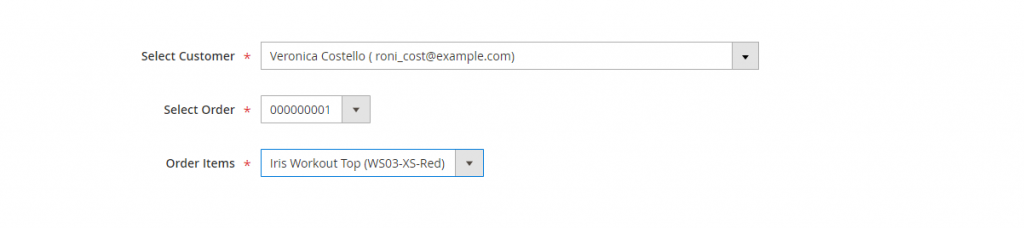
The above is example is simple to hide show files base on the value of the select option. Now we make some complex of it. We are creating three form fields: a customer that shows a list of customers, the second is an order that shows selected customer’s orders, and the last one is ordered items that show selected order’s items.
### **Step-1:** Add the below code
Add the below code at **app/code/Dolphin/DependentFieldsDemo/view/adminhtml/ui\_component/YourUiFormFileName.xml**
```
..........
truefalsetruetrueDolphin\DependentFieldsDemo\Model\Mapper10truetrueui/grid/filters/elements/ui-selectdata.customerfield
setParsed Dolphin_DependentFieldsDemo/js/components/select-orderSelect OrdertruetextDolphin\DependentFieldsDemo\Model\Mapperselectorder_id20truedata.order_id
setParsed Select Itemtruetextselect30true
..........
```
#### **Step-2:** create a customer option
create a customer option **CustomerOptions.php** at **app/code/Dolphin/DependentFieldsDemo/Ui/Component/Create/Form/Customer**
```
customerCollectionFactory = $customerCollectionFactory;
$this->_orderCollectionFactory = $orderCollectionFactory;
}
public function toOptionArray()
{
return $this->getCustomerTree();
}
protected function getCustomerTree()
{
$customerById = [];
if ($this->customerTree === null) {
$collection = $this->customerCollectionFactory->create();
if (count($collection)) {
$collection->addNameToSelect();
foreach ($collection as $customer) {
$customerId = $customer->getEntityId();
$Ordercollection = $this->_orderCollectionFactory->create();
$Ordercollection->addFieldToFilter('customer_id', $customerId);
if (count($Ordercollection)) {
if (!isset($customerById[$customerId])) {
$customerById[$customerId] = [
'value' => $customerId,
];
$customerById[$customerId]['label'] = $customer->getName() .
" ( " . $customer->getEmail() . ")";
}
}
}
$cust_count = count($customerById);
if ($cust_count == 0) {
$options[] = [
'label' => 'You have no Order',
'value' => '',
];
return $options;
}
$this->customerTree = $customerById;
return $this->customerTree;
} else {
$options[] = [
'label' => 'You have no Oreder',
'value' => '',
];
return $options;
}
}
}
}
```
**Now we create a Mapper file that provides order Ids and Order’s items options.**
You also like to use this extension: [Quick order Extension](https://dolphinwebsolution.com/shop/quick-order-for-magento.html)
### Step-3:** create **Mapper.php
create **Mapper.php** at **app/code/Dolphin/DependentFieldsDemo/Model**
```
_orderCollectionFactory = $orderCollectionFactory;
$this->orderRepository = $orderRepository;
$this->map = $this->makeMap();
$this->map1 = $this->makeMapItem();
}
private function makeMap()
{
if ($this->map == null) {
$this->map = $this->buildMap();
}
return $this->map;
}
private function makeMapItem()
{
if ($this->map1 == null) {
$this->map1 = $this->buildMapItems();
}
return $this->map1;
}
private function buildMap()
{
$order = $this->_orderCollectionFactory->create()
->addAttributeToSelect('*');
$items = [];
$options = [];
$result = [];
foreach ($order->getData() as $attribute) {
if ($attribute['customer_id'] != '') {
$result[$attribute['customer_id']][] = [
'label' => $attribute['increment_id'], 'value' => $attribute['increment_id'],
];
}
}
return $result;
}
private function buildMapItems()
{
$result = [];
$orderCollection = $this->_orderCollectionFactory->create()
->addAttributeToSelect('*');
foreach ($orderCollection as $attribute) {
if ($attribute->getCustomerId() != '') {
$order_id = $attribute->getEntityId();
$increment_id = $attribute->getIncrementId();
$order_data = $this->orderRepository->get($order_id);
if (!empty($order_data)) {
foreach ($order_data->getAllItems() as $value) {
$result[$increment_id][] = [
'label' => $value->getName(), 'value' => $value->getProductId(),
];
}
}
}
}
return $result;
}
}
```
**Now we add component JS files**
### **Step-4:** For customers create
For customer create **select-customer.js** at **app/code/Dolphin/DependentFieldsDemo/view/adminhtml/web/js/components**
```
define([
'Magento_Ui/js/form/element/ui-select',
'uiRegistry',
], function (Select,uiRegistry) {
'use strict';
return Select.extend({
defaults: {
mapper: []
},
initialize: function (){
var order_id = uiRegistry.get('index = order_id');
var order_for = uiRegistry.get('index = order_for');
order_id.hide();
order_for.hide();
return this._super();
return this.setDependentOptions(this.value());
},
setParsed: function (data) {
var option = this.parseData(data);
if (data.error) {
return this;
}
this.options([]);
this.setOption(option);
this.set('newOption', option);
},
onUpdate: function (value) {
var order_id_1 = uiRegistry.get('index = order_id');
var order_for_1 = uiRegistry.get('index = order_for');
order_id_1.show();
order_for_1.show();
this.setDependentOptions(value);
return this._super();
},
setDependentOptions: function (value) {
var options = this.mapper['map'][value];
var field = uiRegistry.get('index = order_id');
field.setOptions(options);
return this;
},
parseData: function (data) {
return {
value: data.customer.entity_id,
label: data.customer.name
};
}
});
});
```
### **Step-5:** For order create
For order create **select-order.js** at **app/code/Dolphin/DependentFieldsDemo/view/adminhtml/web/js/components**
```
define([
'underscore',
'uiRegistry',
'Magento_Ui/js/form/element/select',
], function (_, uiRegistry, select) {
'use strict';
return select.extend({
defaults: {
mapper: []
},
setParsed: function (data) {
var option = this.parseData(data);
if (data.error) {
return this;
}
this.options([]);
this.setOption(option);
this.set('newOption', option);
},
onUpdate: function (value) {
this.setDependentOptions(value);
return this._super();
},
setDependentOptions: function (value) {
var options = this.mapper['map1'][value];
var field = uiRegistry.get('index = order_for');
field.setOptions(options);
return this;
},
parseData: function (data) {
return {
value: data.order_id.increment_id,
label: data.order_id.get_name
};
}
});
});
```
**After creating and updating the above files run Magento commands:**
```
php bin/magento setup:upgrade
php bin/magento setup:static-content:deploy -f
php bin/magento cache:clean
```
### Now you show the below output:
### You also like this to read
- [Add custom JS in magento 2](https://dolphinwebsolution.com/how-to-include-add-custom-js-in-magento-2)
- [Create preference in Magento 2](https://dolphinwebsolution.com/how-to-create-preference-in-magento-2)
I hope this helps you. For any doubts regarding this topic, please write your doubts in the comments section.
---
_View the original post at: [https://dolphinwebsolution.com/dependent-fields-in-ui-component-forms-in-magento-2](https://dolphinwebsolution.com/dependent-fields-in-ui-component-forms-in-magento-2)_
_Served as markdown by [Third Audience](https://github.com/third-audience) v3.5.3_
_Generated: 2026-08-26 07:37:44 UTC_