---
title: "Add Custom CSS and JS to custom page layout Magento 2"
url: "https://dolphinwebsolution.com/add-custom-css-js-to-custom-page-layout-magento-2"
date: "2020-11-28T12:30:52+05:30"
modified: "2023-08-28T06:01:46+05:30"
author:
name: "Mahesh Makwana"
categories:
- "Magento"
word_count: 796
reading_time: "4 min read"
summary: "Today we learn how to create custom layout and how to add CSS to this particular layout. Sometime we need some change in our design and we need to change design of any specific page.So at this poin..."
description: "Today we learn how to create custom layout and how to add CSS to this particular layout. Sometime we need some change in our design and we need to change des..."
keywords: "custom CSS,custom Js,custom page layout,custom page layout magento 2,add custom css, Magento"
language: "en"
schema_type: "Article"
related_posts:
- title: "How to Add Custom Product Image Role in Magento 2"
url: "https://dolphinwebsolution.com/how-to-add-custom-product-image-role-in-magento-2"
- title: "How To Setup Cron Time In Magento 2 System Configuration"
url: "https://dolphinwebsolution.com/how-to-setup-cron-time-in-magento-2-system-configuration"
- title: "How to Display swatches instead of labeled product options on Checkout in Magento 2"
url: "https://dolphinwebsolution.com/how-to-display-swatches-instead-of-labeled-product-options-on-checkout-in-magento-2"
---
# Add Custom CSS and JS to custom page layout Magento 2
_Published: November 28, 2020_
_Author: Mahesh Makwana_

> Today we learn how to create custom layout and how to add CSS to this particular layout. Sometime we need some change in our design and we need to change design of any specific page.So at this point custom layout help. First we create a custom layout, after that we add custom CSS and JS to this custom layout.
Today we learn how to create a custom layout and how to add custom CSS to this particular layout. Sometimes we need some change in our design and we need to change design of any specific page. So at this point custom layout help.
## Magento provides the following custom CSS and JS layout:
1. Empty
2. 1 column
3. 2 columns with left bar
4. 2 columns with right bar
5. 3 columns
First, we create a custom layout, after that, we add custom CSS and [custom JS](https://dolphinwebsolution.com/how-to-include-add-custom-js-in-magento-2) to this custom layout.
- **Step-1 :** Create **layouts.xml** file at **app/code/Dolphin/CustomLayout/view/frontend** and add below code.
```
```
File name must be layout id name. Now we create customlayout.xml
- **Step-2 :** Create **customlayout.xml** file at **app/code/Dolphin/CustomLayout/view/frontend/page\_layout** and add below code.
```
```
You can show like this:

And when you apply custom layout then you show output like this:
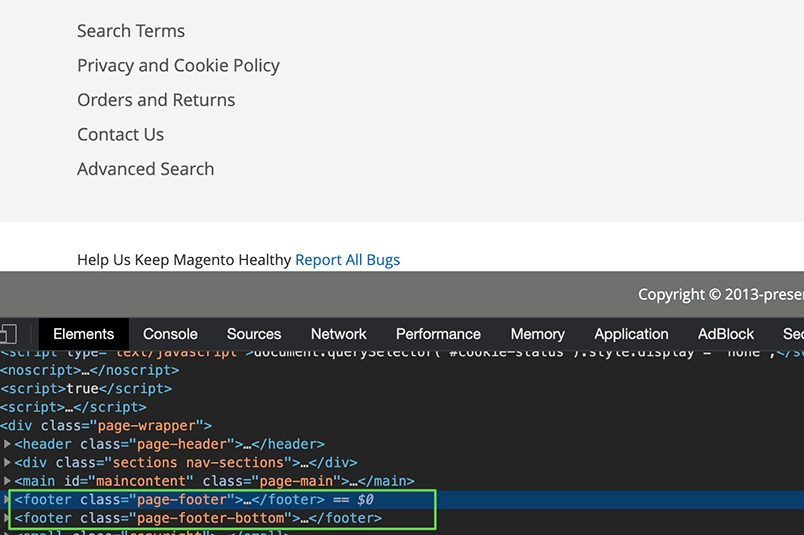You can also add your custom block and phtml file also. which are shown in Layouts when custom layout is used.
**Now we add CSS and Js to custom layout file**
- **Step-3 :** Create **routes.xml** file at **app/code/Dolphin/CustomLayout/etc/frontend** and add below code.
```
```
- **Step-4 :** Create **Index.php** file at **app/code/Dolphin/CustomLayout/Controller/Index** and add below code.
```
resultPageFactory = $resultPageFactory;
parent::__construct($context);
}
public function execute()
{
$resultPage = $this->resultPageFactory->create();
return $resultPage;
}
}
```
- **Step-5 :** Create **customlayout\_index\_index.xml** file at **app/code/Dolphin/CustomLayout/view/frontend/layout** and add below code.
```
```
Here the file name must be like **routename\_controllername\_actionname.xml** and all characters must be in lowercase.
**Add your css to app/code/Dolphin/CustomLayout/view/frontend/web/css/my\_custom\_layout\_css.css**
**Add your Js to app/code/Dolphin/CustomLayout/view/frontend/web/js/my\_custom\_layout\_js.js**
- **Step-6 :** Create **events.xml** file at **app/code/Dolphin/CustomLayout/etc** and add below code.
```
```
- **Step-7 :** Create **CustomLayoutHandler.php** file at **app/code/Dolphin/CustomLayout/Observer** and add below code.
```
_pageResult = $pageResult;
$this->_page = $page;
}
public function execute(\Magento\Framework\Event\Observer $observer)
{
$layout = $observer->getData('layout');
$currentPageLayout = $this->_pageResult->getConfig()->getPageLayout();
//$currentPageLayout = $this->_page->getPageLayout();
if ($currentPageLayout == "customlayout") {
$layout->getUpdate()->addHandle('customlayout_index_index');
}
}
}
```
Now do you can check your CSS and Js into your[ layout page](https://developer.adobe.com/commerce/frontend-core/guide/layouts/create/) by using press **Ctrl + U** you can show your custom CSS and Js to head section.
I hope this helps you. For any doubts regarding this topic, please write your doubts in the comments section.
---
_View the original post at: [https://dolphinwebsolution.com/add-custom-css-js-to-custom-page-layout-magento-2](https://dolphinwebsolution.com/add-custom-css-js-to-custom-page-layout-magento-2)_
_Served as markdown by [Third Audience](https://github.com/third-audience) v3.5.3_
_Generated: 2026-08-26 06:54:10 UTC_