---
title: "Add condition field like Catalog Price Rule in custom Ui-component Form Magento 2 [Part-1]"
url: "https://dolphinwebsolution.com/add-condition-field-like-catalog-price-rule-in-custom-ui-component-form-magento-2/"
date: "2021-04-07T05:14:45+05:30"
modified: "2023-03-03T13:12:59+05:30"
author:
  name: "Mahesh Makwana"
categories:
  - "Magento"
word_count: 5116
reading_time: "26 min read"
summary: "We learn how to add condition field like Catalog Price Rule in Custom Ui-Component Form magento 2.
In Module developer most of need to add condition field into custom form using ui-component. Ther..."
description: "We learn how to add condition field like Catalog Price Rule in Custom Ui-Component Form Magento 2. In Module developer most of need to add condition field in..."
keywords: "Add condition field like Catalog Price Rule in custom Ui-component Form Magento 2, Magento"
language: "en"
schema_type: "Article"
related_posts:
  - title: "Magento Community vs. Magento Enterprise: Which One is Right for Your Business?"
    url: "https://dolphinwebsolution.com/blog/magento-community-vs-magento-enterprise/"
  - title: "How to Download Csv File in Magento 2"
    url: "https://dolphinwebsolution.com/how-to-download-csv-file-in-magento-2"
  - title: "How to Create Child Theme in Magento 2"
    url: "https://dolphinwebsolution.com/how-to-create-child-theme-in-magento-2"
---

# Add condition field like Catalog Price Rule in custom Ui-component Form Magento 2 [Part-1]

_Published: April 7, 2021_  
_Author: Mahesh Makwana_  

![](https://dolphinwebsolution.com/wp-content/uploads/2023/02/custom-Ui-component-1024x512.jpg)

## We learn how to add condition field like Catalog Price Rule in Custom Ui-Component Form magento 2.

In Module developer most of need to add condition field into custom form using ui-component. There are so difficult to find right solution to add condition field into custom form. Here we present whole module with Condition field [**CRUD** operation](https://dolphinwebsolution.com/how-to-perform-crud-operation-with-a-custom-module-in-magento-2). After following below steps you achieve Condition field into Your custom Form.

Basically first we create simple Module. If you already created module then check and match file if some change then apply changes to your files.

**Step-1:** Create **registration.php** at **app/code/Dolphin/AddConditionFiled**

```
<?php
\Magento\Framework\Component\ComponentRegistrar::register(
    \Magento\Framework\Component\ComponentRegistrar::MODULE,
    'Dolphin_AddConditionFiled',
    __DIR__
);
```

**Step-2:** Create **module.xml** at **app/code/Dolphin/AddConditionFiled/etc**

```
<?xml version="1.0"?>

<config xmlns:xsi="http://www.w3.org/2001/XMLSchema-instance" xsi:noNamespaceSchemaLocation="urn:magento:framework:Module/etc/module.xsd">
    <module name="Dolphin_AddConditionFiled" setup_version="1.0.1">
    	<sequence>
           <module name="Magento_Checkout"></module>
           <module name="Magento_Catalog"></module>
       </sequence>
    </module>
</config>
```

Now we add Table where our condition data are stored and you can add or remove column as per your requirement.

**Step-3:** Create **InstallSchema.php** at **app/code/Dolphin/AddConditionFiled/Setup**

```
<?php

namespace Dolphin\AddConditionFiled\Setup;

use Magento\Framework\DB\Ddl\Table;
use Magento\Framework\Setup\InstallSchemaInterface;
use Magento\Framework\Setup\ModuleContextInterface;
use Magento\Framework\Setup\SchemaSetupInterface;

class InstallSchema implements InstallSchemaInterface
{
    public function install(SchemaSetupInterface $setup, ModuleContextInterface $context)
    {
        $installer = $setup;
        $installer->startSetup();
        if (!$installer->tableExists('dolphin_custom_condition')) {
            $tableName = $installer->getTable('dolphin_custom_condition');
            $table = $installer->getConnection()
                ->newTable($tableName)
                ->addColumn(
                    'rule_id',
                    Table::TYPE_INTEGER,
                    10,
                    [
                        'identity' => true,
                        'nullable' => false,
                        'primary' => true,
                    ],
                    'Rule ID'
                )
                ->addColumn(
                    'rule_status',
                    Table::TYPE_INTEGER,
                    null,
                    [
                        'nullable' => true,
                        'default' => null,
                    ],
                    'Rule Status'
                )
                ->addColumn(
                    'rule_name',
                    Table::TYPE_TEXT,
                    255,
                    [
                        'nullable' => true,
                        'default' => null,
                    ],
                    'Rule Name'
                )
                ->addColumn(
                    'conditions_serialized',
                    Table::TYPE_TEXT,
                    '2M',
                    [],
                    'Conditions Serialized'
                )
                ->addColumn(
                    'actions_serialized',
                    Table::TYPE_TEXT,
                    '2M',
                    [],
                    'Actions Serialized'
                )
                ->addColumn(
                    'create_date',
                    \Magento\Framework\DB\Ddl\Table::TYPE_TIMESTAMP,
                    null,
                    [
                        'nullable' => false,
                        'default' => \Magento\Framework\DB\Ddl\Table::TIMESTAMP_INIT,
                    ],
                    'Create Date Time'
                )
                ->setComment('Dolphin Demo For Condition Field')
                ->setOption('type', 'InnoDB')
                ->setOption('charset', 'utf8');
            $installer->getConnection()->createTable($table);
        }
        $installer->endSetup();
    }
}
```

Here [**conditions\_serialized**](https://stackoverflow.com/questions/37358941/how-to-use-catalog-rule-conditions-serialized-to-validate-product-attribute) and **actions\_serialized** are used to store condition field value. So you must be add into you table. After creating table we add resource model and collection. Our Model name is **CustomCondition**.

**Step-4:** Create **CustomCondition.php** at **app/code/Dolphin/AddConditionFiled/Model**

```
<?php

namespace Dolphin\AddConditionFiled\Model;

use Dolphin\AddConditionFiled\Model\ResourceModel\CustomCondition as CustomConditionResourceModel;
use Magento\Quote\Model\Quote\Address;
use Magento\Rule\Model\AbstractModel;

class CustomCondition extends AbstractModel
{
    protected $_eventPrefix = 'dolphin_addconditionfiled';
    protected $_eventObject = 'rule';
    protected $condCombineFactory;
    protected $condProdCombineF;
    protected $validatedAddresses = [];
    protected $_selectProductIds;
    protected $_displayProductIds;

    public function __construct(
        \Magento\Framework\Model\Context $context,
        \Magento\Framework\Registry $registry,
        \Magento\Framework\Data\FormFactory $formFactory,
        \Magento\Framework\Stdlib\DateTime\TimezoneInterface $localeDate,
        \Magento\CatalogRule\Model\Rule\Condition\CombineFactory $condCombineFactory,
        \Magento\SalesRule\Model\Rule\Condition\Product\CombineFactory $condProdCombineF,
        \Magento\Framework\Model\ResourceModel\AbstractResource $resource = null,
        \Magento\Framework\Data\Collection\AbstractDb $resourceCollection = null,
        array $data = []
    ) {
        $this->condCombineFactory = $condCombineFactory;
        $this->condProdCombineF = $condProdCombineF;
        parent::__construct($context, $registry, $formFactory, $localeDate, $resource, $resourceCollection, $data);
    }

    protected function _construct()
    {
        parent::_construct();
        $this->_init(CustomConditionResourceModel::class);
        $this->setIdFieldName('rule_id');
    }

    public function getConditionsInstance()
    {
        return $this->condCombineFactory->create();
    }

    public function getActionsInstance()
    {
        return $this->condCombineFactory->create();
    }

    public function hasIsValidForAddress($address)
    {
        $addressId = $this->_getAddressId($address);
        return isset($this->validatedAddresses[$addressId]) ? true : false;
    }

    public function setIsValidForAddress($address, $validationResult)
    {
        $addressId = $this->_getAddressId($address);
        $this->validatedAddresses[$addressId] = $validationResult;
        return $this;
    }

    public function getIsValidForAddress($address)
    {
        $addressId = $this->_getAddressId($address);
        return isset($this->validatedAddresses[$addressId]) ? $this->validatedAddresses[$addressId] : false;
    }

    private function _getAddressId($address)
    {
        if ($address instanceof Address) {
            return $address->getId();
        }
        return $address;
    }

    public function getConditionsFieldSetId($formName = '')
    {
        return $formName . 'rule_conditions_fieldset_' . $this->getId();
    }

    public function getActionFieldSetId($formName = '')
    {
        return $formName . 'rule_actions_fieldset_' . $this->getId();
    }

    public function getMatchProductIds()
    {
        $productCollection = \Magento\Framework\App\ObjectManager::getInstance()->create(
            '\Magento\Catalog\Model\ResourceModel\Product\Collection'
        );
        $productFactory = \Magento\Framework\App\ObjectManager::getInstance()->create(
            '\Magento\Catalog\Model\ProductFactory'
        );
        $this->_selectProductIds = [];
        $this->setCollectedAttributes([]);
        $this->getConditions()->collectValidatedAttributes($productCollection);
        \Magento\Framework\App\ObjectManager::getInstance()->create(
            '\Magento\Framework\Model\ResourceModel\Iterator'
        )->walk(
            $productCollection->getSelect(),
            [[$this, 'callbackValidateProductCondition']],
            [
                'attributes' => $this->getCollectedAttributes(),
                'product' => $productFactory->create(),
            ]
        );
        return $this->_selectProductIds;
    }

    public function callbackValidateProductCondition($args)
    {
        $product = clone $args['product'];
        $product->setData($args['row']);
        $websites = $this->_getWebsitesMap();
        foreach ($websites as $websiteId => $defaultStoreId) {
            $product->setStoreId($defaultStoreId);
            if ($this->getConditions()->validate($product)) {
                $this->_selectProductIds[] = $product->getId();
            }
        }
    }

    protected function _getWebsitesMap()
    {
        $map = [];
        $websites = \Magento\Framework\App\ObjectManager::getInstance()->create(
            '\Magento\Store\Model\StoreManagerInterface'
        )->getWebsites();
        foreach ($websites as $website) {
            if ($website->getDefaultStore() === null) {
                continue;
            }
            $map[$website->getId()] = $website->getDefaultStore()->getId();
        }
        return $map;
    }
}
```

**Step-5:** Create **CustomCondition.php** at **app/code/Dolphin/AddConditionFiled/Model/ResourceModel**

```
<?php

namespace Dolphin\AddConditionFiled\Model\ResourceModel;

use Magento\Framework\Model\ResourceModel\Db\AbstractDb;

class CustomCondition extends AbstractDb
{
    protected function _construct()
    {
        $this->_init('dolphin_custom_condition', 'rule_id');
    }
}
```

Here we add our **table name** and table **primary key** column name.

**Step-6:** Create **Collection.php** at **app/code/Dolphin/AddConditionFiled/Model/ResourceModel/CustomCondition**

```
<?php

namespace Dolphin\AddConditionFiled\Model\ResourceModel\CustomCondition;

use Dolphin\AddConditionFiled\Model\CustomCondition as CustomConditionModel;
use Dolphin\AddConditionFiled\Model\ResourceModel\CustomCondition as CustomConditionResourceModel;
use Magento\Framework\Model\ResourceModel\Db\Collection\AbstractCollection;

class Collection extends AbstractCollection
{
    protected function _construct()
    {
        $this->_init(
            CustomConditionModel::class,
            CustomConditionResourceModel::class
        );
    }
}
```

**Step-7:** Create **Collection.php** at **app/code/Dolphin/AddConditionFiled/Model/ResourceModel/CustomCondition/Grid**

```
<?php

namespace Dolphin\AddConditionFiled\Model\ResourceModel\CustomCondition\Grid;

use Dolphin\AddConditionFiled\Model\ResourceModel\CustomCondition\Collection as CustomConditionCollection;
use Magento\Framework\View\Element\UiComponent\DataProvider\Document as CustomConditionModel;

class Collection extends CustomConditionCollection implements \Magento\Framework\Api\Search\SearchResultInterface
{
    protected $aggregations;

    public function __construct(
        \Magento\Framework\Data\Collection\EntityFactoryInterface $entityFactory,
        \Psr\Log\LoggerInterface $logger,
        \Magento\Framework\Data\Collection\Db\FetchStrategyInterface $fetchStrategy,
        \Magento\Framework\Event\ManagerInterface $eventManager,
        $mainTable,
        $eventPrefix,
        $eventObject,
        $resourceModel,
        $model = CustomConditionModel::class,
        $connection = null,
        \Magento\Framework\Model\ResourceModel\Db\AbstractDb $resource = null
    ) {
        parent::__construct($entityFactory, $logger, $fetchStrategy, $eventManager, $connection, $resource);
        $this->_eventPrefix = $eventPrefix;
        $this->_eventObject = $eventObject;
        $this->_init($model, $resourceModel);
        $this->setMainTable($mainTable);
    }

    public function getAggregations()
    {
        return $this->aggregations;
    }

    public function setAggregations($aggregations)
    {
        $this->aggregations = $aggregations;
    }

    public function getAllIds($limit = null, $offset = null)
    {
        return $this->getConnection()->fetchCol($this->_getAllIdsSelect($limit, $offset), $this->_bindParams);
    }

    public function getSearchCriteria()
    {
        return null;
    }

    public function setSearchCriteria(\Magento\Framework\Api\SearchCriteriaInterface $searchCriteria = null)
    {
        return $this;
    }

    public function getTotalCount()
    {
        return $this->getSize();
    }

    public function setTotalCount($totalCount)
    {
        return $this;
    }

    public function setItems(array $items = null)
    {
        return $this;
    }
}
```

Here this collection.php file form show and processing data into Grid.

**Step-8:** Create **di.xml** at **app/code/Dolphin/AddConditionFiled/etc**

```
<?xml version="1.0"?>

<config xmlns:xsi="http://www.w3.org/2001/XMLSchema-instance" xsi:noNamespaceSchemaLocation="../../../../../lib/internal/Magento/Framework/ObjectManager/etc/config.xsd">

    <virtualType name="DolphinAddConditionFiledFilterPool"
                 type="Magento\Framework\View\Element\UiComponent\DataProvider\FilterPool">
        <arguments>
            <argument name="appliers" xsi:type="array">
                <item name="regular" xsi:type="object">Magento\Framework\View\Element\UiComponent\DataProvider\RegularFilter</item>
                <item name="fulltext" xsi:type="object">Magento\Framework\View\Element\UiComponent\DataProvider\FulltextFilter</item>
            </argument>
        </arguments>
    </virtualType>

    <virtualType name="DolphinAddConditionFiledFilterPool"
                 type="Magento\Framework\View\Element\UiComponent\DataProvider\DataProvider">
        <arguments>
            <argument name="collection" xsi:type="object" shared="false">Dolphin\AddConditionFiled\Model\ResourceModel\CustomCondition\Collection</argument>
            <argument name="filterPool" xsi:type="object" shared="false">DolphinAddConditionFiledFilterPool</argument>
        </arguments>
    </virtualType>

    <type name="Dolphin\AddConditionFiled\Model\ResourceModel\CustomCondition\Grid\Collection">
        <arguments>
            <argument name="mainTable" xsi:type="string">dolphin_custom_condition</argument>
            <argument name="eventPrefix" xsi:type="string">dolphin_custom_condition_grid_collection</argument>
            <argument name="eventObject" xsi:type="string">dolphin_custom_condition_grid_collection</argument>
            <argument name="resourceModel" xsi:type="string">Dolphin\AddConditionFiled\Model\ResourceModel\CustomCondition</argument>
        </arguments>
    </type>

    <type name="Magento\Framework\View\Element\UiComponent\DataProvider\CollectionFactory">
        <arguments>
            <argument name="collections" xsi:type="array">
                <item name="custom_condition_listing_data_source" xsi:type="string">Dolphin\AddConditionFiled\Model\ResourceModel\CustomCondition\Grid\Collection</item>
            </argument>
        </arguments>

    </type>
</config>
```

Now we create admin route.

**Step-9:** Create **routes.xml** at **app/code/Dolphin/AddConditionFiled/etc/adminhtml**

```
<?xml version="1.0"?>

<config xmlns:xsi="http://www.w3.org/2001/XMLSchema-instance" xsi:noNamespaceSchemaLocation="../../../../../../lib/internal/Magento/Framework/App/etc/routes.xsd">
    <router id="admin">
        <route id="addconditionfiled" frontName="addconditionfiled">
            <module name="Dolphin_AddConditionFiled" before="Magento_Backend"/>
        </route>
    </router>
</config>
```

**Step-10:** Create **Index.php** at **app/code/Dolphin/AddConditionFiled/Controller/Adminhtml/Index**

```
<?php

namespace Dolphin\AddConditionFiled\Controller\Adminhtml\Index;

class Index extends \Magento\Backend\App\Action
{
    protected $resultPageFactory;

    public function __construct(
        \Magento\Backend\App\Action\Context $context,
        \Magento\Framework\View\Result\PageFactory $resultPageFactory
    ) {
        parent::__construct($context);
        $this->resultPageFactory = $resultPageFactory;
    }

    public function execute()
    {
        $resultPage = $this->resultPageFactory->create();
        $resultPage->getConfig()->getTitle()->prepend(__('Add Rules'));
        return $resultPage;
    }
}
```

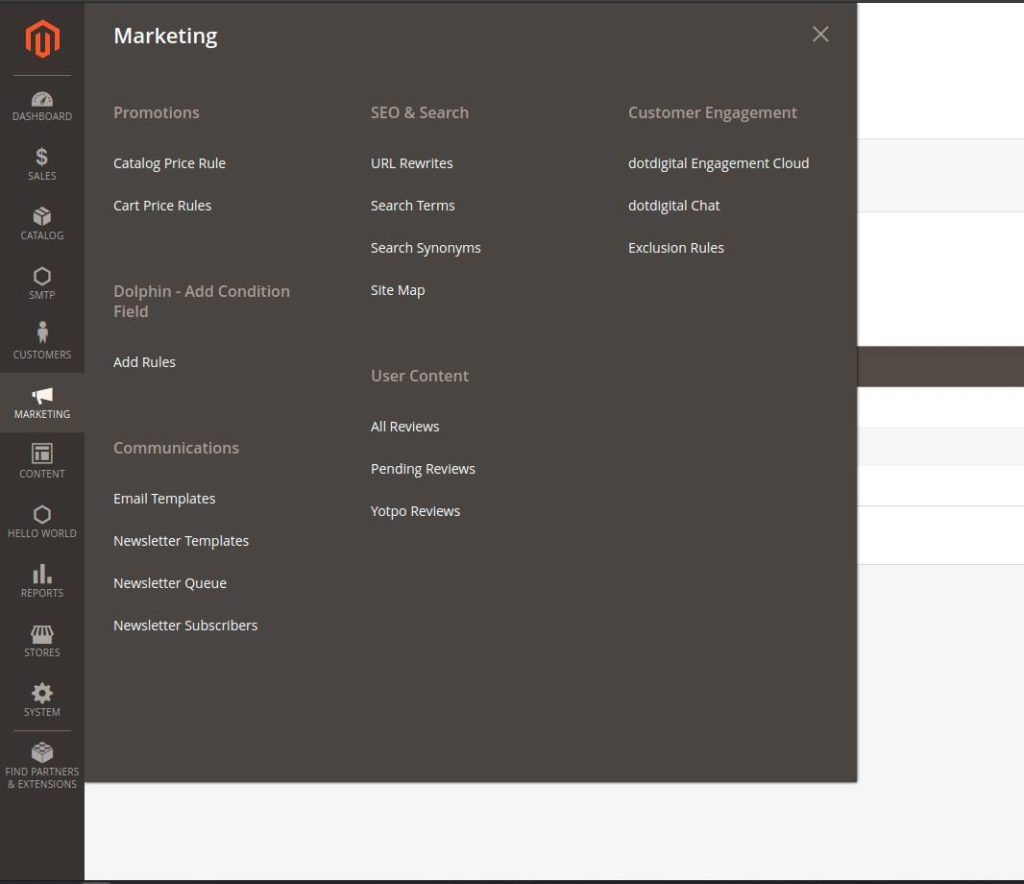
Now we create menu into admin panel.

**Step-11:** Create **menu.xml** at **app/code/Dolphin/AddConditionFiled/etc/adminhtml**

```
<?xml version="1.0"?>
<config xmlns:xsi="http://www.w3.org/2001/XMLSchema-instance" xsi:noNamespaceSchemaLocation="../../../../Magento/Backend/etc/menu.xsd">
   <menu>
        <add id="Dolphin_AddConditionFiled::dolphin_addconditionfiled"
             title="Dolphin - Add Condition Field"
             translate="title"
             module="Dolphin_AddConditionFiled"
             sortOrder="10"
             parent="Magento_Backend::marketing"
             resource="Dolphin_AddConditionFiled::dolphin_addconditionfiled" />

        <add id="Dolphin_AddConditionFiled::menu"
             title="Add Rules"
             module="Dolphin_AddConditionFiled"
             sortOrder="100"
             parent="Dolphin_AddConditionFiled::dolphin_addconditionfiled"
             action="addconditionfiled/index/index"
             resource="Dolphin_AddConditionFiled::menu"/>
    </menu>
</config>
```

You can show like below into menu section in [administration](https://dolphinwebsolution.com/shop/magento-2-extensions/administration.html) panel.
![AI Integration in Magento: Benefits, Use Cases and Business Impact](https://dolphinwebsolution.com/wp-content/uploads/2021/04/Show-Menu--1024x884.jpg)

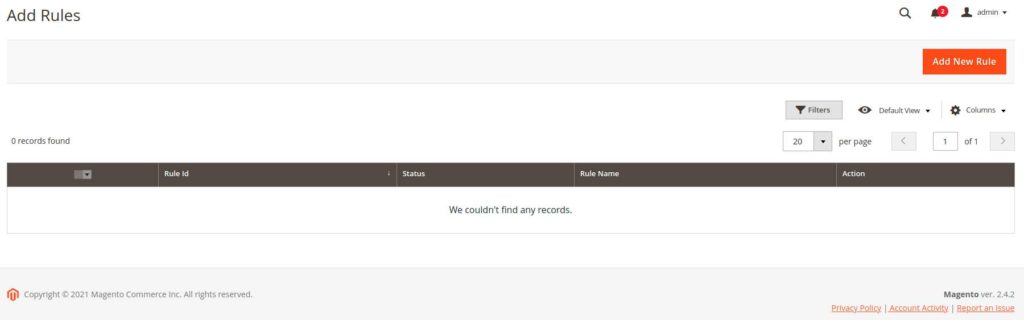
Now create admin grid to show rule data.

**Step-12:** Create **addconditionfiled\_index\_index.xml** at **app/code/Dolphin/AddConditionFiled/view/adminhtml/layout**

```
<?xml version="1.0"?>

<page xmlns:xsi="http://www.w3.org/2001/XMLSchema-instance" xsi:noNamespaceSchemaLocation="../../../../../../../lib/internal/Magento/Framework/View/Layout/etc/page_configuration.xsd">
    <update handle="styles"/>
    <body>

        <referenceContainer name="content">
            <uiComponent name="custom_condition_listing"/>
        </referenceContainer>
    </body>
</page>
```

**Step-13:** Create **custom\_condition\_listing.xml** at **app/code/Dolphin/AddConditionFiled/view/adminhtml/ui\_component**

```
<?xml version="1.0"?>
    <argument name="data" xsi:type="array">
        <item name="js_config" xsi:type="array">
            <item name="provider" xsi:type="string">custom_condition_listing.custom_condition_listing_data_source</item>
            <item name="deps" xsi:type="string">custom_condition_listing.custom_condition_listing_data_source</item>
        </item>
        <item name="spinner" xsi:type="string">custom_condition_columns</item>
        <item name="buttons" xsi:type="array">
            <item name="add" xsi:type="array">
                <item name="name" xsi:type="string">add</item>
                <item name="label" xsi:type="string" translate="true">Add New Rule</item>
                <item name="class" xsi:type="string">primary</item>
                <item name="url" xsi:type="string">*/*/add</item>
            </item>
        </item>
    </argument>
    <dataSource name="custom_condition_listing_data_source">
        <argument name="dataProvider" xsi:type="configurableObject">
            <argument name="class" xsi:type="string">DolphinAddConditionFiledFilterPool</argument>
            <argument name="name" xsi:type="string">custom_condition_listing_data_source</argument>
            <argument name="primaryFieldName" xsi:type="string">rule_id</argument>
            <argument name="requestFieldName" xsi:type="string">id</argument>
            <argument name="data" xsi:type="array">
                <item name="config" xsi:type="array">
                    <item name="component" xsi:type="string">Magento_Ui/js/grid/provider</item>
                    <item name="update_url" xsi:type="url" path="mui/index/render"/>
                    <item name="storageConfig" xsi:type="array">
                        <item name="cacheRequests" xsi:type="boolean">false</item>
                    </item>
                </item>
            </argument>
        </argument>
        <argument name="data" xsi:type="array">
            <item name="js_config" xsi:type="array">
                <item name="component" xsi:type="string">Magento_Ui/js/grid/provider</item>
            </item>
        </argument>
    </dataSource>
    <container name="listing_top">
        <argument name="data" xsi:type="array">
            <item name="config" xsi:type="array">
                <item name="template" xsi:type="string">ui/grid/toolbar</item>
                <item name="stickyTmpl" xsi:type="string">ui/grid/sticky/toolbar</item>
            </item>
        </argument>
        <bookmark name="bookmarks">
            <argument name="data" xsi:type="array">
                <item name="config" xsi:type="array">
                    <item name="storageConfig" xsi:type="array">
                        <item name="namespace" xsi:type="string">custom_condition_listing</item>
                    </item>
                </item>
            </argument>
        </bookmark>
        <component name="columns_controls">
            <argument name="data" xsi:type="array">
                <item name="config" xsi:type="array">
                    <item name="columnsData" xsi:type="array">
                        <item name="provider" xsi:type="string">custom_condition_listing.custom_condition_listing.custom_condition_columns</item>
                    </item>
                    <item name="component" xsi:type="string">Magento_Ui/js/grid/controls/columns</item>
                    <item name="displayArea" xsi:type="string">dataGridActions</item>
                </item>
            </argument>
        </component>
        <filters name="listing_filters">
            <argument name="data" xsi:type="array">
                <item name="config" xsi:type="array">
                    <item name="columnsProvider" xsi:type="string">custom_condition_listing.custom_condition_listing.custom_condition_columns</item>
                    <item name="storageConfig" xsi:type="array">
                        <item name="provider" xsi:type="string">custom_condition_listing.custom_condition_listing.listing_top.bookmarks</item>
                        <item name="namespace" xsi:type="string">current.filters</item>
                    </item>
                    <item name="templates" xsi:type="array">
                        <item name="filters" xsi:type="array">
                            <item name="select" xsi:type="array">
                                <item name="component" xsi:type="string">Magento_Ui/js/form/element/ui-select</item>
                                <item name="template" xsi:type="string">ui/grid/filters/elements/ui-select</item>
                            </item>
                        </item>
                    </item>
                    <item name="childDefaults" xsi:type="array">
                        <item name="provider" xsi:type="string">custom_condition_listing.custom_condition_listing.listing_top.listing_filters</item>
                        <item name="imports" xsi:type="array">
                            <item name="visible" xsi:type="string">custom_condition_listing.custom_condition_listing.custom_condition_columns.${ $.index }:visible</item>
                        </item>
                    </item>
                </item>
                <item name="observers" xsi:type="array">
                    <item name="column" xsi:type="string">column</item>
                </item>
            </argument>
        </filters>
        <paging name="listing_paging">
            <argument name="data" xsi:type="array">
                <item name="config" xsi:type="array">
                    <item name="storageConfig" xsi:type="array">
                        <item name="provider" xsi:type="string">custom_condition_listing.custom_condition_listing.listing_top.bookmarks</item>
                        <item name="namespace" xsi:type="string">current.paging</item>
                    </item>
                    <item name="selectProvider" xsi:type="string">custom_condition_listing.custom_condition_listing.custom_condition_columns.ids</item>
                </item>
            </argument>
        </paging>
    </container>
    <columns name="custom_condition_columns">
        <settings>
            <childDefaults>
                <param name="fieldAction" xsi:type="array">
                    <item name="provider" xsi:type="string">custom_condition_listing.custom_condition_listing.custom_condition_columns.actions</item>
                    <item name="target" xsi:type="string">applyAction</item>
                    <item name="params" xsi:type="array">
                        <item name="0" xsi:type="string">view</item>
                        <item name="1" xsi:type="string">${ $.$data.rowIndex }</item>
                    </item>
                </param>
            </childDefaults>
        </settings>
        <selectionsColumn name="ids">
            <argument name="data" xsi:type="array">
                <item name="config" xsi:type="array">
                    <item name="resizeEnabled" xsi:type="boolean">false</item>
                    <item name="resizeDefaultWidth" xsi:type="string">55</item>
                    <item name="indexField" xsi:type="string">rule_id</item>
                    <item name="sortOrder" xsi:type="number">0</item>
                </item>
            </argument>
        </selectionsColumn>
        <column name="rule_id">
            <argument name="data" xsi:type="array">
                <item name="config" xsi:type="array">
                    <item name="filter" xsi:type="string">textRange</item>
                    <item name="sorting" xsi:type="string">asc</item>
                    <item name="label" xsi:type="string" translate="true">Rule Id</item>
                    <item name="sortOrder" xsi:type="number">10</item>
                </item>
            </argument>
        </column>
        <column name="rule_status">
          <argument name="data" xsi:type="array">
            <item name="options" xsi:type="array">
              <item name="0" xsi:type="array">
              <item name="label" xsi:type="string">Enable</item>
              <item name="sortOrder" xsi:type="number">45</item>
              <item name="value" xsi:type="string">1</item>
            </item>
              <item name="1" xsi:type="array">
              <item name="label" xsi:type="string">Disable</item>
              <item name="value" xsi:type="string">0</item>
            </item>
            </item>
            <item name="config" xsi:type="array">
              <item name="editor" xsi:type="string">select</item>
              <item name="filter" xsi:type="string">select</item>
              <item name="component" xsi:type="string">Magento_Ui/js/grid/columns/select</item>
              <item name="dataType" xsi:type="string">select</item>
              <item name="label" xsi:type="string" translate="true">Status</item>
            </item>
          </argument>
        </column>
        <column name="rule_name">
            <argument name="data" xsi:type="array">
                <item name="config" xsi:type="array">
                    <item name="filter" xsi:type="string">text</item>
                    <item name="label" xsi:type="string" translate="true">Rule Name</item>
                    <item name="sortOrder" xsi:type="number">20</item>
                    <item name="resizeEnabled" xsi:type="boolean">true</item>
                </item>
            </argument>
        </column>
        <actionsColumn name="actions" class="Dolphin\AddConditionFiled\Ui\Component\Listing\Column\AddConditionFiledActions">
           <argument name="data" xsi:type="array">
               <item name="config" xsi:type="array">
                   <item name="resizeEnabled" xsi:type="boolean">false</item>
                   <item name="resizeDefaultWidth" xsi:type="string">107</item>
                   <item name="indexField" xsi:type="string">rule_id</item>
                   <item name="sortOrder" xsi:type="number">120</item>
               </item>
           </argument>
       </actionsColumn>
    </columns>
```

**Step-14:** Create **AddConditionFiledActions.php** at **app/code/Dolphin/AddConditionFiled/Ui/Component/Listing/Column**

```
<?php

namespace Dolphin\AddConditionFiled\Ui\Component\Listing\Column;

class AddConditionFiledActions extends \Magento\Ui\Component\Listing\Columns\Column
{
    protected $urlBuilder;

    const URL_DELETE_PATH = 'addconditionfiled/index/delete';
    const URL_VIEW_PATH = 'addconditionfiled/index/edit';

    public function __construct(
        \Magento\Framework\UrlInterface $urlBuilder,
        \Magento\Framework\View\Element\UiComponent\ContextInterface $context,
        \Magento\Framework\View\Element\UiComponentFactory $uiComponentFactory,
        array $components = [],
        array $data = []
    ) {
        $this->urlBuilder = $urlBuilder;
        parent::__construct($context, $uiComponentFactory, $components, $data);
    }

    public function prepareDataSource(array $dataSource)
    {
        if (isset($dataSource['data']['items'])) {
            foreach ($dataSource['data']['items'] as &$item) {
                if (isset($item['rule_id'])) {
                    $item[$this->getData('name')] = [
                        'view' => [
                            'href' => $this->urlBuilder->getUrl(
                                static::URL_VIEW_PATH,
                                [
                                    'rule_id' => $item['rule_id'],
                                ]
                            ),
                            'label' => __('Edit'),
                        ],
                        'delete' => [
                            'href' => $this->urlBuilder->getUrl(
                                static::URL_DELETE_PATH,
                                [
                                    "rule_id" => $item['rule_id'],
                                ]
                            ),
                            'label' => __('Delete'),
                            'confirm' => [
                                'title' => __('Delete'),
                                'message' => __('Are you sure you want to delete this rule ?'),
                            ],
                        ],
                    ];
                }
            }
        }
        return $dataSource;
    }
}
```

Now your admin grid show like below:
![AI Integration in Magento: Benefits, Use Cases and Business Impact](https://dolphinwebsolution.com/wp-content/uploads/2021/04/admin-grid-show-1024x320.jpg)

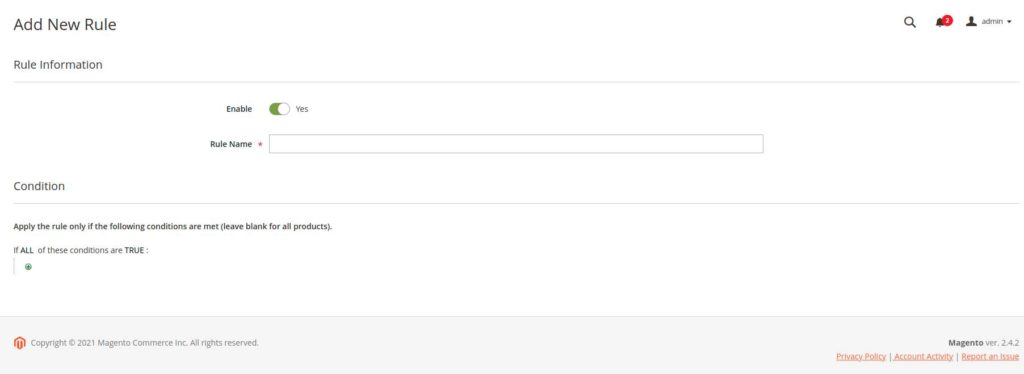
Now we create Form with Condition field when user click on Add New Rule button.

**Step-15:** Create **Add.php** at **app/code/Dolphin/AddConditionFiled/Controller/Adminhtml/Index**

```
<?php

namespace Dolphin\AddConditionFiled\Controller\Adminhtml\Index;

use Magento\Framework\Controller\ResultFactory;

class Add extends \Magento\Backend\App\Action
{
    public function execute()
    {
        $resultPage = $this->resultFactory->create(ResultFactory::TYPE_PAGE);
        $resultPage->getConfig()->getTitle()->prepend(__('Add New Rule'));
        return $resultPage;
    }

}
```

**Step-16:** Create **addconditionfiled\_index\_add.xml** at **app/code/Dolphin/AddConditionFiled/view/adminhtml/layout**

```
<?xml version="1.0"?>

<page xmlns:xsi="http://www.w3.org/2001/XMLSchema-instance" xsi:noNamespaceSchemaLocation="../../../../../../../lib/internal/Magento/Framework/View/Layout/etc/page_configuration.xsd">
    <update handle="styles"/>
    <body>
        <referenceContainer name="content">
            <uiComponent name="custom_condition_form"/>
        </referenceContainer>
    </body>
</page>
```

**Step-17:** Create **custom\_condition\_form.xml** at **app/code/Dolphin/AddConditionFiled/view/adminhtml/layout**

```
<?xml version="1.0" encoding="UTF-8"?>
<form xmlns:xsi="http://www.w3.org/2001/XMLSchema-instance" xsi:noNamespaceSchemaLocation="urn:magento:module:Magento_Ui:etc/ui_configuration.xsd">
    <argument name="data" xsi:type="array">
        <item name="js_config" xsi:type="array">
            <item name="provider" xsi:type="string">custom_condition_form.custom_condition_listing_data_source</item>
            <item name="deps" xsi:type="string">custom_condition_form.custom_condition_listing_data_source</item>
        </item>
        <item name="label" xsi:type="string" translate="true">General Information</item>
        <item name="config" xsi:type="array">
            <item name="dataScope" xsi:type="string">data</item>
            <item name="namespace" xsi:type="string">custom_condition_form</item>
        </item>
        <item name="spinner" xsi:type="string">general_information</item>
        <!-- <item name="buttons" xsi:type="array">
            <item name="back" xsi:type="string">Dolphin\AddConditionFiled\Block\Adminhtml\Edit\Button\Back</item>
            <item name="delete" xsi:type="string">Dolphin\AddConditionFiled\Block\Adminhtml\Edit\Button\Delete</item>
            <item name="reset" xsi:type="string">Dolphin\AddConditionFiled\Block\Adminhtml\Edit\Button\Reset</item>
            <item name="save" xsi:type="string">Dolphin\AddConditionFiled\Block\Adminhtml\Edit\Button\Save</item>
        </item> -->
        <item name="template" xsi:type="string">templates/form/collapsible</item>
    </argument>
    <dataSource name="custom_condition_listing_data_source">
        <argument name="dataProvider" xsi:type="configurableObject">
            <argument name="class" xsi:type="string">Dolphin\AddConditionFiled\Model\DataProvider</argument>
            <argument name="name" xsi:type="string">custom_condition_listing_data_source</argument>
            <argument name="primaryFieldName" xsi:type="string">rule_id</argument>
            <argument name="requestFieldName" xsi:type="string">rule_id</argument>
            <argument name="data" xsi:type="array">
              <item name="config" xsi:type="array">
                 <item name="submit_url" xsi:type="url" path="*/*/save"/>
              </item>
            </argument>
        </argument>
        <argument name="data" xsi:type="array">
            <item name="js_config" xsi:type="array">
                <item name="component" xsi:type="string">Magento_Ui/js/form/provider</item>
            </item>
        </argument>
    </dataSource>
    <fieldset name="rule_data">
        <argument name="data" xsi:type="array">
            <item name="config" xsi:type="array">
                <item name="collapsible" xsi:type="boolean">false</item>
                <item name="label" xsi:type="string" translate="true">Rule Information</item>
                <item name="sortOrder" xsi:type="number">10</item>
            </item>
        </argument>
        <field name="rule_status">
            <argument name="data" xsi:type="array">
                <item name="config" xsi:type="array">
                    <item name="sortOrder" xsi:type="number">10</item>
                    <item name="dataType" xsi:type="string">boolean</item>
                    <item name="formElement" xsi:type="string">checkbox</item>
                    <item name="prefer" xsi:type="string">toggle</item>
                    <item name="label" xsi:type="string" translate="true">Enable</item>
                    <item name="valueMap" xsi:type="array">
                        <item name="true" xsi:type="number">1</item>
                        <item name="false" xsi:type="number">0</item>
                    </item>
                    <item name="valuesForOptions" xsi:type="array">
                        <item name="boolean" xsi:type="string">boolean</item>
                    </item>
                    <item name="default" xsi:type="number">1</item>
                    <item name="dataScope" xsi:type="string">rule_status</item>
                </item>
            </argument>
        </field>
        <field name="rule_name">
            <argument name="data" xsi:type="array">
                <item name="config" xsi:type="array">
                    <item name="sortOrder" xsi:type="number">25</item>
                    <item name="dataType" xsi:type="string">text</item>
                    <item name="label" xsi:type="string" translate="true">Rule Name</item>
                    <item name="formElement" xsi:type="string">input</item>
                    <item name="source" xsi:type="string">rule_name</item>
                    <item name="dataScope" xsi:type="string">rule_name</item>
                    <item name="validation" xsi:type="array">
                        <item name="required-entry" xsi:type="boolean">true</item>
                    </item>
                </item>
            </argument>
        </field>
    </fieldset>
    <fieldset name="condition_data">
        <argument name="data" xsi:type="array">
            <item name="config" xsi:type="array">
                <item name="collapsible" xsi:type="boolean">false</item>
                <item name="label" xsi:type="string" translate="true">Condition</item>
                <item name="sortOrder" xsi:type="number">20</item>
            </item>
        </argument>
        <container name="conditions_serialized">
            <argument name="data" xsi:type="array">
                <item name="config" xsi:type="array">
                    <item name="sortOrder" xsi:type="number">50</item>
                </item>
            </argument>
            <htmlContent name="html_content">
                <argument name="block" xsi:type="object">Dolphin\AddConditionFiled\Block\Adminhtml\Catalog\ConditionField\Condition</argument>
            </htmlContent>
        </container>
    </fieldset>
</form>
```

Here we add comment on form button show code in above file. We will create this buttons files into our next part-2 of above topic. And also we add **conditions\_serialized container** which is responsible for showing condition field into form.

**Step-18:** Create **Condition.php** at **app/code/Dolphin/AddConditionFiled/Block/Adminhtml/Catalog/ConditionField**

```
<?php

namespace Dolphin\AddConditionFiled\Block\Adminhtml\Catalog\ConditionField;

use Magento\Backend\Block\Widget\Form\Generic;
use Magento\Backend\Block\Widget\Tab\TabInterface;
use Magento\Framework\App\ObjectManager;

class Condition extends Generic implements TabInterface
{
    protected $_rendererFieldset;

    protected $_conditions;

    protected $_nameInLayout = 'conditions';

    private $ruleFactory;

    private $CustomConditionFactory;

    public function __construct(
        \Magento\Backend\Block\Template\Context $context,
        \Magento\Framework\Registry $registry,
        \Magento\Framework\Data\FormFactory $formFactory,
        \Magento\Rule\Block\Conditions $conditions,
        \Magento\Backend\Block\Widget\Form\Renderer\Fieldset $rendererFieldset,
        \Dolphin\AddConditionFiled\Model\CustomConditionFactory $CustomConditionFactory,
        array $data = []
    ) {
        $this->_rendererFieldset = $rendererFieldset;
        $this->_conditions = $conditions;
        $this->CustomConditionFactory = $CustomConditionFactory;
        parent::__construct($context, $registry, $formFactory, $data);
    }

    private function getRuleFactory()
    {
        if ($this->ruleFactory === null) {
            $this->ruleFactory = ObjectManager::getInstance()->get('Dolphin\AddConditionFiled\Model\CustomConditionFactory');
        }
        return $this->ruleFactory;
    }

    public function getTabClass()
    {
        return null;
    }

    public function getTabUrl()
    {
        return null;
    }

    public function isAjaxLoaded()
    {
        return false;
    }

    public function getTabLabel()
    {
        return __('Conditions');
    }

    public function getTabTitle()
    {
        return __('Conditions');
    }

    public function canShowTab()
    {
        return true;
    }

    public function isHidden()
    {
        return false;
    }

    protected function _prepareForm()
    {
        $model = $this->_coreRegistry->registry('current_rule');
        $form = $this->addTabToForm($model);
        $this->setForm($form);

        return parent::_prepareForm();
    }

    protected function addTabToForm(
        $model,
        $fieldsetId = 'conditions_serialized_field',
        $formName = 'custom_condition_form'
    ) {
        if (!$model) {
            $id = $this->getRequest()->getParam('rule_id');
            $model = $this->getRuleFactory()->create();
            $model->load($id);
        }
        $conditionsFieldSetId = $model->getConditionsFieldSetId($formName);
        $newChildUrl = $this->getUrl(
            'catalog_rule/promo_catalog/newConditionHtml/form/' . $conditionsFieldSetId,
            ['form_namespace' => $formName]
        );

        $form = $this->_formFactory->create();
        $form->setHtmlIdPrefix('rule_');
        $renderer = $this->_rendererFieldset->setTemplate(
            'Magento_CatalogRule::promo/fieldset.phtml'
        )->setNewChildUrl(
            $newChildUrl
        )->setFieldSetId(
            $conditionsFieldSetId
        );

        $fieldset = $form->addFieldset(
            $fieldsetId,
            [
                'legend' => __(
                    'Apply the rule only if the following conditions are met (leave blank for all products).'
                ),
            ]
        )->setRenderer(
            $renderer
        );
        $fieldset->addField(
            'conditions',
            'text',
            [
                'name' => 'conditions',
                'label' => __('Conditions'),
                'title' => __('Conditions'),
                'required' => true,
                'data-form-part' => $formName,
            ]
        )->setRule(
            $model
        )->setRenderer(
            $this->_conditions
        );
        $form->setValues($model->getData());
        $this->setConditionFormName($model->getConditions(), $formName);
        return $form;
    }

    private function setConditionFormName(\Magento\Rule\Model\Condition\AbstractCondition $conditions, $formName)
    {
        $conditions->setFormName($formName);
        if ($conditions->getConditions() && is_array($conditions->getConditions())) {
            foreach ($conditions->getConditions() as $condition) {
                $this->setConditionFormName($condition, $formName);
            }
        }
    }
}
```

After adding above files you can see condition field into your form like below:
![Show Condition Field into Form](https://dolphinwebsolution.com/wp-content/uploads/2021/04/Screenshot-from-2021-04-08-09-51-57-1024x374.jpg)

In next [**Part-2**](https://dolphinwebsolution.com/add-condition-field-like-catalog-price-rule-in-custom-ui-component-form-magento-2-part-2) we will save this condition field into our custom table and also we learn how to check how many products are match.

**[Above topic is not finished now we go to our next part-2 of the topic](https://dolphinwebsolution.com/add-condition-field-like-catalog-price-rule-in-custom-ui-component-form-magento-2-part-2).**

I hope this helps you. For any doubts regarding this topic, please write your doubts in the comments section.

</body>


---

_View the original post at: [https://dolphinwebsolution.com/add-condition-field-like-catalog-price-rule-in-custom-ui-component-form-magento-2/](https://dolphinwebsolution.com/add-condition-field-like-catalog-price-rule-in-custom-ui-component-form-magento-2/)_  
_Served as markdown by [Third Audience](https://github.com/third-audience) v3.5.3_  
_Generated: 2026-08-26 06:55:10 UTC_  
